Troubleshooting Your Brother Sewing Machine: Quick Guide
Urgent, step-by-step troubleshooting for common Brother sewing machine issues. Diagnose causes, perform safe fixes, and prevent future problems with practical guidance from Sewing Machine Help.


Most likely causes are threading mispaths, bobbin misalignment, or an improperly installed needle. Start with the simplest fixes: re-thread the machine, check the bobbin, and reseat the needle. If the problem persists, move to tension and timing checks. This guide from Sewing Machine Help provides a step-by-step approach to diagnose and fix common Brother issues.
What is likely going wrong with your Brother sewing machine
When you ask, “what is wrong with my brother sewing machine,” you’re usually facing a mechanical or threading-related issue rather than a mysterious defect. According to Sewing Machine Help, the majority of problems come from three areas: the thread path, the needle and bobbin alignment, or timing and tension. Start by documenting your symptoms: did stitches skip, fabric bunch, or the needle break? Note any changes you made recently (new thread, different fabric, or a bumped table). This helps you distinguish user error from a genuine machine fault. Safety is paramount, so unplug the machine before you touch anything inside the case. With careful checks, you’ll narrow down the root cause and avoid unnecessary repairs. In this guide, you’ll learn how to methodically diagnose and fix common Brother sewing machine issues, using clear steps and practical tips.
Common symptoms and their meanings
Many sewing machine problems present with predictable symptoms. If you’re dealing with one or more of these, you’re likely facing a specific category of fault. Skipped stitches often point to needle or thread path issues. Thread breakage can indicate tension imbalance or incompatible thread, while constant jams may suggest a tangled bobbin or fabric caught in the feed dogs. Unusual noises might come from a bent needle, a loose presser foot, or timing misalignment. For beginners, matching symptoms to probable causes shortens repair time and reduces the risk of making it worse. The goal is to isolate symptoms, then apply targeted fixes rather than random fixes that might aggravate the problem. Always test on scrap fabric after each change to avoid wasting sewing project fabric.
Safety first: essential checks before you touch the machine
Before you begin any troubleshooting, turn off and unplug the machine. Remove the needle plate if you’re comfortable, and keep the workspace well-lit. Check the power cord and switch to ensure there are no visible signs of wear or damage. Inspect the presser foot and feed dogs for lint or fabric fibers. If you notice a belt-driven system, ensure the belt isn’t loose or cracked. Refill or replace the spool with the correct type and weight of thread to reduce tension issues. Never force a jam; gently backfabric to release it. These safe, non-invasive checks prevent personal injury and protect the machine’s delicate timing and gears. Once basic safety checks are complete, you can move on to targeted fixes with a clear mind and steady hands.
Basic troubleshooting you can perform without tools
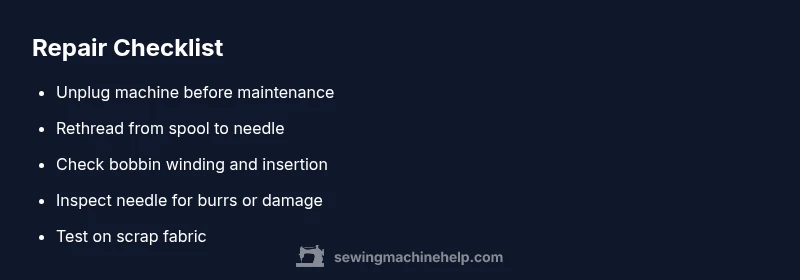
Start with the simplest, safest fixes. Re-thread the entire path from spool to needle, making sure thread follows the correct route. Reinsert the needle with the flat side facing the right direction and use the appropriate needle type for your fabric. Reseat the bobbin, check that it’s wound evenly, and ensure it’s inserted correctly according to the manual. Replace the needle if you see any burrs or if it’s bent. Clean lint from the bobbin case and under the throat plate. Finally, test with scrap fabric to verify that stitches are consistent. These steps often resolve the majority of beginner issues and prevent bigger problems down the line. If you still see problems, you’ll know you’re dealing with a more complex fault.
Diagnosing by symptoms: jam, skip stitch, won’t sew, unusual noises
A structured approach helps distinguish simple issues from mechanical faults. If you see jams, the bobbin or feed path is most likely blocked. If stitches skip, inspect needle size, installation, and thread tension. If the machine won’t sew, confirm power and stitch selection; check foot pressure and the feed dog motion. Unusual noises typically indicate a bent needle, a loose belt, or timing concerns. Create a symptom-log as you test each hypothesis, and after each fix, run a test on scrap fabric to verify improvement. If the problem persists after applying these checks, you should escalate to more advanced diagnostics, possibly requiring professional service.
When to replace parts vs. service
Not every issue warrants a major repair. Simple fixes often involve replacing a needle, thread, or bobbin. If you notice consistent skipped stitches after correct threading and needle replacement, timing or a worn feed mechanism could be the culprit. A frayed belt, worn gear teeth, or misaligned timing usually requires professional service. If you’re uncomfortable with opening the needle plate or adjusting internal components, it’s safer to seek an authorized technician. For beginners, a service visit can save time and prevent inadvertent damage that could occur during DIY repairs. Remember: if the machine is under warranty, consult the warranty guide before doing any internal adjustments to avoid voiding coverage.
Maintenance routines to prevent future problems
Prevention starts with a regular maintenance routine. Clean lint and dust from the bobbin area and tension discs after every few projects. Oil optional moving parts only if the manual specifies it; avoid over-oiling, which can attract dust. Replace needles regularly, especially after breaking or sewing through dense fabrics. Use the correct needle type for the fabric you’re sewing. Store threads and bobbins in a clean, dry place to prevent rust and contamination. Schedule a light service every 6–12 months depending on usage, or more often for high-volume projects. By establishing these habits, you reduce the likelihood of repeated problems and keep your Brother sewing machine running smoothly over time.
Next steps: how to proceed if you’re stuck
If you’ve walked through these checks and the machine still misbehaves, it’s time to gather error data and contact support. Collect model number, a description of the symptoms, and notes about any recent changes (thread, fabric, or maintenance). Share these with a professional technician or the manufacturer’s support team for faster diagnosis. For ongoing maintenance, keep a simple log of service dates, parts replaced, and performance notes. The Sewing Machine Help team recommends a proactive approach: address small issues before they escalate, and never ignore unusual signs that persist after basic fixes. With careful diagnostics, you’ll regain control over your projects and extend the life of your Brother machine.
Steps
Estimated time: 30-45 minutes
- 1
Power down and prepare to inspect
Unplug the machine, remove the foot pedal if applicable, and set the needle to the highest position. Remove the needle plate if you’re comfortable and clear any visible lint. This first step ensures your safety and gives you a clean workspace for troubleshooting.
Tip: Always unplug before touching internal parts to prevent accidental starts. - 2
Rethread from spool to needle
Follow the thread path exactly as the manual shows. Use the correct thread type for your fabric, and ensure the presser foot is up during threading. After threading, gently pull the thread to feel smooth tension. Reinsert the needle if you notice burrs or signs of damage.
Tip: Threading mistakes are the most common cause of many issues. - 3
Check the bobbin setup
Remove, unwind, and re-wind the bobbin correctly. Place it back in the bobbin case with the thread feeding in the correct direction. Close the cover and gently pull the thread to confirm it advances freely without catching.
Tip: A loose or misinserted bobbin often hides the root cause. - 4
Inspect and replace the needle
Remove the needle and inspect for bending or burrs. Replace with a fresh needle of the appropriate type for your fabric. Reinsert with the flat side oriented correctly as per the manual.
Tip: A bent needle is a frequent source of skipped stitches and fabric snags. - 5
Test with scrap fabric
Set up a small scrap project and run a test stitch. Listen for unusual noises, watch for thread breaks, and assess stitch quality. If stitched lines look even, gradually increase fabric difficulty to confirm stability.
Tip: Testing on scrap protects your real project from damage. - 6
Assess tension and re-test
If issues persist, adjust upper thread tension and verify bobbin tension. Make small changes and retest on scrap fabric; document what works. When in doubt, reset to factory defaults and retest.
Tip: Tension adjustments can fix many persistent stitch problems.
Diagnosis: Machine won't sew or exhibits consistent issues after basic checks
Possible Causes
- highThread path misalignment or tangled thread
- highBobbin incorrectly wound or inserted
- highNeedle installed incorrectly or damaged
- mediumTension settings off or incompatible thread
Fixes
- easyRethread the machine from spool to needle, ensuring correct path
- easyRewind and reinsert the bobbin; ensure it feeds smoothly
- easyReplace needle with correct type/size for fabric
- easyReset tension to default and test on scrap fabric
Your Questions Answered
Why won't my Brother sewing machine sew after changing thread colors?
Thread color changes can alter tension if the upper thread or bobbin are not balanced. Re-thread both paths, ensure the needle is appropriate for the fabric, and test on scrap fabric. If the problem persists, inspect tension discs for any residue or misalignment.
Thread color changes can affect tension. Re-thread both paths and test on scrap fabric.
What does it mean if stitches skip on my Brother machine?
Skipped stitches usually point to needle installation, thread path, or tension issues. Check that the needle is straight, seated fully, and compatible with the fabric. Rethread and retest with a fresh needle.
Skipped stitches usually mean the needle or thread path needs checking.
Can a bent needle cause fabric damage?
Yes. A bent needle can snag fabric, cause skipped stitches, and potentially break the needle. Replace with a new, correctly sized needle before continuing.
A bent needle can damage fabric and cause jams.
Is timing adjustment safe to do at home?
Timings issues can be serious and sometimes require professional service. If timing is suspected, consult the manual and consider a certified technician to avoid further damage.
Timing adjustments can be risky; consider a professional if timing is suspected.
How often should I service my Brother sewing machine?
Regular light maintenance is best—cleaning lint, oiling only where the manual says, and replacing needles. Schedule a professional service every 6–12 months if you sew frequently.
For frequent sewing, have a pro service every 6–12 months.
What should I do if the machine still stalls after basic fixes?
If stalling persists, note your symptoms and seek professional help. A technician can assess timing, belts, and internal wear that aren’t safe to inspect at home.
If it still stalls, seek professional diagnosis.
Watch Video
The Essentials
- Rethread and recheck bobbin first
- Replace needles regularly
- Test on scrap fabric after every fix
- Unplug before any inspection
- If issues persist, seek professional service