Sewing Machine Replacement Parts: A Practical Guide
Explore sewing machine replacement parts: how to identify exact part numbers, verify compatibility, choose OEM vs aftermarket, source reliably, and perform installation and maintenance for home sewists.


For sewing machine replacement parts, start by identifying the exact part number for your model, then verify compatibility with your machine’s make, year, and serial. Buy from reputable suppliers that offer easy returns, and favor OEM parts when possible or high-quality aftermarket parts with traceable sourcing. Follow official manuals for installation tips and consult a pro if unsure.
Understanding Sewing Machine Replacement Parts
Sewing machine replacement parts are precision components that restore alignment, timing, and stitch quality. When you replace a part, the goal is to match the exact part number for your model, verify material compatibility, and ensure correct installation. Using the wrong part can throw the machine out of timing, cause skipped stitches, or damage gears over time. This is why a careful sourcing process matters for home sewists who rely on consistent results.
According to Sewing Machine Help, the most reliable repairs start with a model-year check and a cross-reference of OEM parts versus reputable aftermarket options. Start by locating the model and serial number on your machine, then consult the manufacturer catalog or an authorized retailer to confirm the compatible part number. If you’re shopping aftermarket, look for traceable sourcing, clear warranties, and documented compatibility with your exact model. Keep in mind that some older machines use slightly different part families even within the same model line.
Key replacement parts you’ll encounter include needles, belts, bobbins, gear assemblies, feed dogs, and motor components such as brushes or couplings. While it’s tempting to stock up on common items, don’t assume universal compatibility. Parts like presser feet and needle plates come in many variations that affect stitch type and fabric handling. By building a small parts inventory, you’ll reduce downtime and avoid mismatched components during a repair.
How to Verify Part Compatibility
The foundation of a successful replacement is a precise model-to-part match. Start by pulling the exact model number, serial number, and, if available, the machine’s year of manufacture from labels on the body or in the user manual. Then cross-check the indicated part number with the manufacturer’s catalog, or with trusted retailers who publish compatibility charts.
Next, compare physical specs: needle type and size, belt length, pulley diameter, bobbin orientation (vertical vs. horizontal), and screw hole spacing for covers or feet. Some parts share a family but differ slightly in dimensions; even small deviations can affect timing or fit. If you’re uncertain, contact the seller’s support with photos and model details. Finally, review the return policy and warranty—reputable suppliers offer coverage if the part proves incompatible.
Keep a record of the part numbers you’ve confirmed, along with purchase receipts. This helps you build a reliable history of replacements and supports any future repairs. In short, compatibility is a mix of model identity, dimensional checks, and documented supplier reliability.
OEM vs Aftermarket: Making the Right Choice
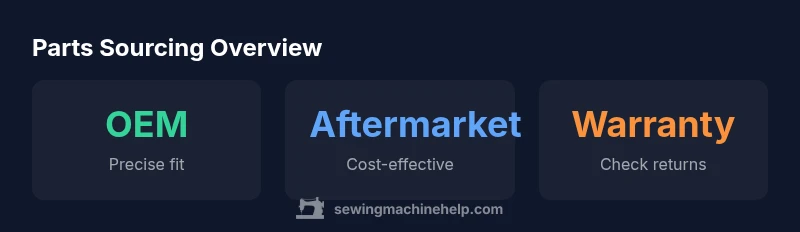
Choosing between OEM (original equipment manufacturer) parts and reputable aftermarket options comes down to fit, performance, and budget. OEM parts are engineered for your exact model, offering precise tolerances and a known fit. They’re often preferred by serious sewists who demand consistent stitch quality and long-term reliability. The downside is higher cost and sometimes longer lead times.
Aftermarket parts can be significantly cheaper and widely available, especially for older models or common machines. When selecting aftermarket parts, prioritize those with clear specifications, material quality, and warranty terms. Look for parts that list compatibility with your exact model and confirm that the supplier stands behind the product. If a non-OEM part carries a solid warranty and easy returns, it can be a smart, cost-effective choice. The key is documentation and a trustworthy supplier.
Regardless of choice, avoid parts with vague specs, unlabeled origins, or aggressive discount promises. For most hobbyists, a well-vetted aftermarket option paired with a strong return policy offers a practical balance between cost and reliability.
Common Replacement Parts You’ll Encounter
Below are the most frequently replaced components, with notes on what to check and when to replace them.
- Needles: There are many needle types and sizes; using the wrong needle for fabric or stitch type can cause skipped stitches or fabric snags. Always verify needle size and shank type for your model.
- Belts: Drive belts wear out and can slip, reducing stitch consistency. Check belt tension and length compatibility with the machine’s pulley system.
- Bobbins: Bobbin type (vertical or horizontal) and size must match the shuttle; incorrect bobbins can cause tangling or tension issues.
- Gear assemblies: Worn gears create timing drift and irregular stitches. Inspect for cracks, excessive play, or unusual noise.
- Feed dogs: Worn teeth affect fabric transport and stitch formation. If feed dogs are rounded or missing teeth, replacement is advisable.
- Motor components: Brushes and couplings wear over time, reducing motor performance. Inspect for noise, reduced power, or intermittent operation.
When replacing these parts, ensure you’re using the correct family and model-specific version. If in doubt, consult the machine’s service manual or a qualified technician.
Installation, Testing, and Maintenance
Preparation is essential before any replacement: unplug the machine, gather the right tools, and work in a clean, well-lit area. Keep screws organized and refer to the service manual for the exact disassembly sequence. When installing, align parts precisely and tighten fasteners to the recommended torque. After installation, bench-test the machine on a scrap fabric to check stitch quality, tension, and feed. If components interact, recheck alignment and reassemble if necessary. Finally, document the replacement in your maintenance log and set a reminder to recheck parts periodically. Regular cleaning, lubrication per the manufacturer’s instructions, and proper storage extend this workhorse’s life.
Troubleshooting After Replacement
Even correctly installed parts can reveal new issues. Common post-replacement problems include: skipped stitches, thread bunching, unusual noises, or timing irregularities. Start troubleshooting by rechecking part compatibility and installation steps. Examine thread paths for snags, re-thread the machine from scratch, and verify tension settings. If issues persist, consult the service manual’s timing alignment section or seek professional help. Keep in mind that some symptoms may indicate multiple underlying causes, so a systematic approach is best.
Parts compatibility table: key checks and signals for common replacements
| Part Type | Role | Key Compatibility Check | Typical Replacement Signals |
|---|---|---|---|
| Needle | Stitches fabric; guides thread | Needle size and shank type; fabric compatibility | Frequent skipped stitches; thread breaks; fabric snagging |
| Belt | Transmits drive to moving parts | Length and pulley compatibility | Slipping, reduced speed, or squealing |
| Bobbin | Stores thread; feeds under needle | Bobbin type (vertical vs horizontal) and size | Thread jams; tangling; loose bobbin case |
| Gear assembly | Transmits timing and motion | Model-specific gear set and tooth count | Grinding noise; timing drift; irregular stitches |
Your Questions Answered
What should I do if a replacement part isn’t listed for my model?
Check the manufacturer’s cross-reference or consult an authorized retailer for compatible alternatives. If in doubt, contact support before purchasing to avoid non-fitting parts.
If your model isn’t listed, verify with the supplier’s compatibility charts or reach out to support before buying.
Are aftermarket parts as reliable as OEM?
Reliability varies by manufacturer. Look for parts with clear specifications, documented compatibility, warranties, and a reputable seller. OEM is typically the safest bet for timing and fit.
It depends—choose reputable aftermarket parts with warranties and clear specs, or stick with OEM for guaranteed fit.
How can I avoid counterfeit parts?
Buy only from authorized dealers or well-known retailers. Check part numbers, vendor reputation, and return policy. If a price seems too good to be true, verify authenticity.
Stick to trusted sellers and verify that the part number matches your model.
What tools do I need to install a replacement part?
Common tools include screwdrivers, pliers, tweezers, and the machine’s service manual-required tools. Keep a clean workspace and organize fasteners.
Have the right screwdriver set and keep a tidy workspace ready for any tiny fasteners.
How long do replacement parts typically last?
Lifespan depends on usage, part type, and maintenance. Regular cleaning and lubrication extend life, but moving parts like belts and gears wear over time.
It varies, but regular upkeep helps parts last longer.
Can I replace parts myself if I’m a beginner?
Some parts are straightforward (needles, belts, bobbins) while others (timing gears) require expertise. Start with simple replacements and seek professional help for complex tasks.
Yes for simple parts, but bigger jobs may need a professional.
“Replacement parts must match the machine’s specifications in tolerances, materials, and fit. A correct part preserves timing and stitch quality, while a poor match accelerates wear or damage.”
The Essentials
- Identify the exact part number before buying
- Verify model compatibility and serial/year data
- Choose OEM for guaranteed fit or vetted aftermarket with warranties
- Test the part after installation and keep documentation for maintenance history