What is Wrong with My Singer Sewing Machine? Troubleshooting Guide
Urgent, practical guide to diagnose and fix common Singer sewing machine issues. Safe checks, step-by-step fixes, and prevention tips to get your machine stitching again quickly.


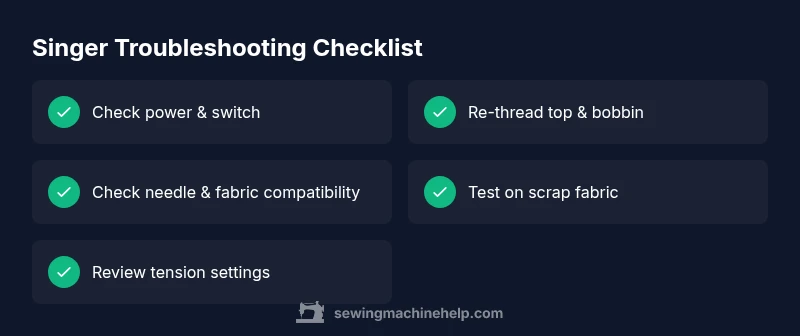
The most likely culprits are threading or tension problems on a Singer sewing machine. Start by unplugging, rethreading the top path and bobbin exactly as the manual shows, and test on scrap fabric. If the issue persists, replace the needle and verify the fabric and needle size match.
What is usually going wrong with your Singer sewing machine
According to Sewing Machine Help, most home sewing machine issues boil down to simple, user-facing causes rather than hidden malfunctions. When people ask, “what is wrong with my singer sewing machine,” they’re often describing a problem that traces back to threading, tension, or needle issues. Start with the basics: check that the machine is threaded correctly for your fabric type, the bobbin is wound and seated properly, and the needle is the right type for the material you’re using. Many stumbles come from skipping basic steps or using incompatible thread, needle, or fabric. If you keep these points in mind, you’ll quickly eliminate the most common culprits and get back to sewing with confidence.
Essential safety checks you should perform immediately
Before you do anything, prioritize safety. Unplug the machine from power and remove the spool, needle, and bobbin to inspect parts. Check for any loose screws, bent needles, or lint buildup around the feed dogs and bobbin area. A quick surface wipe and a gentle brush can remove dust that interferes with smooth operation. Verify your foot pedal is functioning (some issues are pedal-related rather than machine-related). If you have a walking foot or specialty feet, ensure they’re properly attached and compatible with your model. These safety checks prevent accidental injuries and prevent further damage to delicate components.
Common symptoms and their likely causes
Stitches skipping or uneven? Likely a bent needle, wrong needle size for fabric, or tension misadjustment. Thread bunching under fabric usually means upper thread tension is too loose or the bobbin path isn’t threaded correctly. If the machine won’t sew at all, confirm power, switch on, and ensure the needle is fully inserted and grabbing the fabric; timing issues are rarer but require professional help. For noisy operation, check for lint, thread debris, or a loose pulley. By mapping symptoms to likely causes, you can rapidly triage and pursue the most productive fixes.
The diagnostic flow: symptom to solution
This section maps typical Singer problems to a short diagnostic path. Start with the symptom you observe, then consider the most common causes in order of likelihood, and apply the simplest fix first. If a fix doesn’t resolve the issue, move to the next suspected cause. This flow emphasizes safe checks, patient testing, and documenting what works to avoid repeating steps. Always stop if something feels unsafe or unusual—timing or gear damage should be handled by a professional. This method keeps you focused and minimizes downtime.
Step-by-step: fix the most common cause (threading and tension)
Maintenance and prevention to avoid future issues
When to seek professional help and how to prepare for it
Steps
Estimated time: 20-40 minutes
- 1
Power down and prepare the work area
Unplug the machine, remove the power cord, and clear the needle plate. Have good lighting and a clean workspace. This minimizes the risk of injury and helps you see thread paths clearly.
Tip: Always work on a stable, flat surface to prevent the machine from tipping. - 2
Re-thread the top thread
Raise the presser foot, thread the machine from the spool, guide the thread through all guides, and finally seat it through the needle eye from front to back. Use the machine’s manual path if available.
Tip: Don’t skip thread guides; a single misrouted thread is a common cause of skipped stitches. - 3
Check/replace the needle
Remove the old needle, inspect for bent or burrs, and replace with a fresh needle appropriate for your fabric. Thread the needle and insert it securely with the flat side facing the correct direction.
Tip: Use a new needle for each project to prevent blade dullness that can cut threads. - 4
Rewind and seat the bobbin
Wind the bobbin evenly, insert it in the bobbin case according to the manual, and thread the top thread again to test. Ensure the bobbin rotates counterclockwise when you pull the thread tail gently.
Tip: Avoid over-tight bobbin tension; start with the factory settings if you’re unsure. - 5
Test on scrap fabric
Run a few inches of stitch on scrap fabric to verify that stitches are balanced, clear, and the fabric feeds smoothly. If not, adjust upper tension or try a different needle size.
Tip: Always test on similar fabric to your final project to gauge results.
Diagnosis: Machine won’t stitch or has quality issues
Possible Causes
- highThread path incorrect or loose upper thread
- highBobbin incorrectly wound or seated
- highBent needle or incorrect needle type for fabric
- mediumTension settings misadjusted
- lowTiming issue or damaged feed dogs
Fixes
- easyRethread top and bobbin with the correct path shown in the manual
- easyRewind and reinsert bobbin, ensuring it drops and winds evenly
- easyReplace needle and ensure it’s the appropriate type/size for the fabric
- mediumReset tension by following model-specific instructions or perform a fresh spool and thread setup
- hardIf timing or internal gears are suspected, consult a service technician
Your Questions Answered
My Singer sewing machine won’t start even when powered on. What should I check first?
First confirm the power switch is on, the outlet is live, and the cord is intact. Check the foot pedal if model-dependent. If it still won’t respond, inspect the machine’s internal wiring or consult the manual for model-specific startup procedures.
Check the power switch and outlet, then the pedal. If it still won’t start, consult the manual for your model.
Why do stitches bunch underneath the fabric?
This is usually upper thread tension or bobbin threading problems. Rethread both paths carefully, ensure the needle is correct for the fabric, and test on scrap fabric.
Check the thread path and tension, then rethread and test.
What causes stitches to skip or be uneven?
Often a bent or dull needle, incorrect needle size, or mismatched fabric. Replace the needle, verify size, and rethread. If the problem persists, adjust the tension gradually.
Replace the needle and check the tension; rethread and test on scrap.
How often should I service a Singer machine?
Regular cleaning and oiling as per the manual is recommended; most home users benefit from a professional service every 1–3 years depending on usage.
Clean and oil as the manual says, and consider professional service every 1–3 years.
Can I fix timing issues myself?
Timing is delicate and model-specific. If timing seems off or the problem recurs after basic fixes, seek professional repair to avoid further damage.
Timing problems are best left to a professional if basic fixes don’t help.
What needle size is best for denim?
Denim typically requires a heavier needle size (like a 90/14 or 100/16), plus sturdy thread and appropriate stitch type. Always test on fabric scraps first.
Use a sturdy denim needle, and test on scraps before sewing.
Watch Video
The Essentials
- Start with simple threading/tension fixes
- Replace needles regularly and match to fabric
- Follow the exact threading path for your Singer model
- Test fixes on scrap fabric before resuming projects
- Know when to call a professional for timing or internal repairs