Troubleshooting: Why Your Sewing Machine Makes Noise
Discover practical steps to diagnose and fix common sewing machine noises. Learn safe, easy techniques to quiet your machine and prevent future issues with home maintenance.


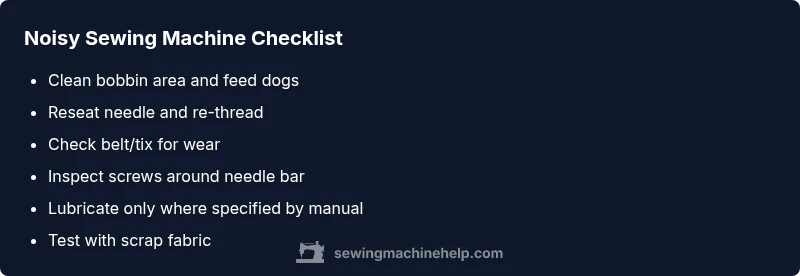
If you hear unusual noises, you’re likely dealing with lint buildup, a loose screw, or a mis-threaded needle. This quick guide explains why sewing machine makes noise and gives a safe 2-3 step fix you can try now. Start by cleaning the bobbin area, reseating the needle, and re-threading, then test at low speed.
What Causes Noise in a Sewing Machine?
Noise in a sewing machine usually signals that something is rubbing, skipping, or binding as the machine operates. The most common culprits are mechanical wear, improper setup, or routine maintenance that slipped by. According to Sewing Machine Help, the majority of noises fall into a few broad categories: lint or thread caught in moving parts, loose fasteners vibrating during operation, needle and bobbin misalignment, or timing that has shifted slightly over time. The exact sound you hear can help narrow the issue: squeaks often point to dry bearings or belts; grinding might indicate a worn gear train; a ping or metallic click can signal a bolt or screw that has loosened. The goal isn’t to guess wildly, but to map the sound to a likely subsystem and start with safe, reversible checks. By approaching the problem methodically, home sewists can often restore quiet operation without expensive service.
Quick Fixes You Can Try Right Now
Start with the simplest checks: unplug the machine, remove the presser foot, and inspect the bobbin area for lint. If lint is visible, vacuum or brush it away carefully. Reseat the needle: remove and reinstall a new, compatible needle, then re-thread top and bobbin. Check the needle plate and ensure the needle clears it with a smooth path. Re-test at a slow speed to listen for changes. If the noise remains, examine screws around the needle bar and presser foot for looseness and tighten gently if needed. Finally, inspect the belt (if your model uses one) for cracks or looseness and replace if necessary. These steps address the majority of household noises and restore safe operation without tools beyond a small brush and screwdriver.
Common Noises and What They Signal
- Squealing or squeaking: often a dry bearing, belt issue, or lint in the bobbin area. Lubrication may be needed only if the manual allows; otherwise, cleaning should be first.
- Grinding: usually worn gears, a pinched belt, or a mis-threaded path; power off and check belt and gear housing, do not force parts.
- Buzzing or humming: motor issues, power supply, or timing; ensure motor mounting is secure.
- Metallic ping: loose screws, needle hitting the plate, or a bent needle; check screws around the throat plate and replace the needle.
These signals help you decide which area to inspect first and whether a quick adjustment will restore quiet operation or if a service call is needed.
Cleaning and Maintenance to Quiet Your Machine
A clean machine runs more quietly and reliably. Begin by removing lint from the bobbin case, shuttle, and feed dogs using a small brush or compressed air (when safe for your model). Wipe away dust from the top housing and motor cover, then vacuum any loose debris. Reinsert fresh oil if your model’s manual allows lubrication in specified points; never oil gears that aren’t designated for lubrication. Reassemble and run a short test stitch with scrap fabric. Document parts that look worn or misaligned so you can replace them before they fail. Regular cleaning and a simple, monthly maintenance check set a foundation for long-term quiet operation.
Threading, Tension, and Timing: The Three Ts
Threading, tension, and timing are the three levers that determine how smoothly your machine runs. A wrongly threaded path or incorrect tension causes friction and noise. Start by re-threading the upper thread and bobbin, ensuring thread paths are clean and aligned. Check fabric tension and adjust the presser foot pressure if appropriate for your material. Timing issues are less common but can cause loud jerks or rhythmic thumps; if timing is suspect, avoid random adjustments and consult the manual or a pro. Remember: make one change at a time and test after each adjustment to isolate the cause without creating new problems.
Lubrication: When and How to Oil (And When Not To)
Some older or less sealed machines require periodic lubrication at designated points. If your model’s manual specifies oil, use only the recommended type and amount, typically drop-by-drop in precise locations. Over-oiling can attract lint, increasing noise rather than reducing it. Modern machines with sealed gear trains often don’t require lubrication at all; applying oil where it’s not intended can void warranties or cause damage. When in doubt, consult the user manual or contact a qualified technician before applying lubricant. Proper lubrication reduces friction and noise, extends life, and improves stitch consistency.
Diagnostic Flow at a Glance
Use this quick mental model: identify the symptom, map it to a likely cause, apply a safe fix, test, and escalate if necessary. If the noise persists after basic fixes, revisit cleanliness, needle condition, and thread path. When you suspect timing or gear wear, it’s best to stop and seek professional help rather than forcing components. Regular maintenance and careful observation will help you catch problems early and keep your machine quiet.
Preventive Maintenance Schedule to Keep It Quiet
Create a simple calendar: weekly quick clean (lint removal around the bobbin area), monthly deeper clean (pull and inspect feed dogs and bobbin mechanism), and semi-annual professional service for timing checks and gear inspection. Use a dedicated brush, a small vacuum attachment, and the right lubricant if your manual allows it. Store the machine in a dust-free area and cover it when not in use to minimize debris. Small, consistent maintenance reduces noise and prevents drafts of avoidable wear.
Steps
Estimated time: 45-60 minutes
- 1
Power down and prep
Unplug the machine, remove the foot, and set up a clean workspace. Gather a small brush, a microfiber cloth, and a replacement needle. The goal is to create a safe baseline before you touch moving parts.
Tip: Always unplug before inspection. - 2
Inspect and clean the bobbin area
Open the bobbin case, remove the bobbin, and look for lint or thread fragments. Clear buildup with the brush and a gentle blast of compressed air if appropriate for your model. Reassemble carefully.
Tip: Avoid forcing lint through tight spaces. - 3
Check the needle and threading
Remove the needle and inspect for bending or dullness. Install a new needle of the correct type and size for your fabric. Rethread the top and bobbin exactly as shown in your manual.
Tip: Use the right needle for the fabric. - 4
Test stitch at low speed
With scrap fabric, stitch slowly to listen for changes. If the noise improves, gradually increase speed while watching thread paths and needle alignment.
Tip: Make incremental tests to avoid surprises. - 5
Check screws and belt or drive system
Inspect visible screws around the needle bar and presser foot. If a belt or gear is present, check for cracks or looseness and tighten or replace as needed.
Tip: Looseness can wobble and amplify noise. - 6
Re-lubricate if required by model
If your machine’s manual specifies lubrication, apply only to the exact points and with the specified oil. Wipe away any excess to avoid dust attraction.
Tip: Follow the manual to avoid warranty issues.
Diagnosis: Machine makes unusual noises during stitching, jams, or stops randomly
Possible Causes
- highLint buildup around the bobbin area or feed dogs
- mediumLoose or damaged parts (screws, belts)
- highNeedle hitting the throat plate or incorrectly installed needle
- lowTension or timing issues
- lowWorn gears or motor problems
Fixes
- easyClean lint from bobbin area and feed dogs; remove lint with small brush
- easyReseat or replace needle; re-thread top and bobbin
- mediumCheck screws and belts for tightness; tighten or replace
- hardInspect timing and mechanical alignment; adjust only if confident
- hardConsult a professional for worn gears or motor issues
Your Questions Answered
Why does my sewing machine make a grinding noise?
Grinding noises often indicate worn gears, a snagged belt, or lint in the gear area. Start by inspecting the belt, cleaning nearby parts, and ensuring gears can move freely. If the sound persists, professional assessment may be required.
Grinding usually means gears or lint; check the belt and clean the area, then test. If it continues, seek a pro.
Is it safe to oil my sewing machine to fix noise?
Only oil if your manual says so. Many modern machines are sealed and do not require lubrication; oiling in the wrong places can attract lint and cause more noise.
Oil only if the manual says so. Sealed machines rarely need lubrication.
Should I replace the needle to stop noise?
Yes. A bent or dull needle creates friction and noise. Replace with the correct size for your fabric and re-thread before testing again.
A sharp needle is key; replace if bent or dull and re-thread.
My machine only makes noise when sewing thick fabric. What gives?
Thick fabrics can stress the feed system and tension. Adjust fabric guide, foot pressure, and needle size, and ensure you're using the appropriate needle for the material.
Thick fabrics may reveal tension or needle issues; adjust accordingly.
When should I seek professional help?
If you hear persistent grinding, rhythmic thumping, or suspect timing issues, stop sewing and consult a qualified technician. Timely service can prevent bigger problems.
If timing or gears seem off, get a pro to check it.
Watch Video
The Essentials
- Start with simple checks: clean, reseat needle, re-thread.
- Identify the noise type to narrow down causes.
- Regular cleaning and proper threading reduce most noise.
- Use recommended lubrication only when necessary.
- Consult a professional for hard-to-diagnose noises.