Brother Sewing Machine Comparison: A Practical Buying Guide
Analytical Brother sewing machine comparison for home sewists, weighing mechanical vs computerized models, stitch options, features, price ranges, and buying guidance.


The quick answer in this Brother sewing machine comparison is that mid-range computerized Brother models typically offer the best balance of features, ease of use, and future compatibility for most home sewists. Entry-level mechanical machines are great for learning and sticking to core tasks, while mid-range options unlock a broader stitch library and automated conveniences. Read on for the nuances, tests, and a clear recommendation based on your projects.
Brand landscape: Why Brother remains a solid option for hobbyists and beginners
Brother sewing machines have a long-standing reputation for balancing affordability with practical reliability, which is why they appear frequently in home sewing spaces and community classes. For home sewists whose projects range from hemming curtains to crafting tote bags, Brother models offer plug-and-play setup, widely available replacement parts, and a global support network. According to Sewing Machine Help, the brand's breadth of service centers and online resources makes troubleshooting accessible even for first-time buyers. The Sewing Machine Help team found that many novice users feel confident starting with a mechanical, no-frills model and upgrading later if their projects demand more stitches or automation. That upgrade path is a common path for people who want to learn without risking a steep learning curve. In short, Brother often wins on value and long-term support for beginners and hobbyists.
Core differences: mechanical vs computerized Brother models
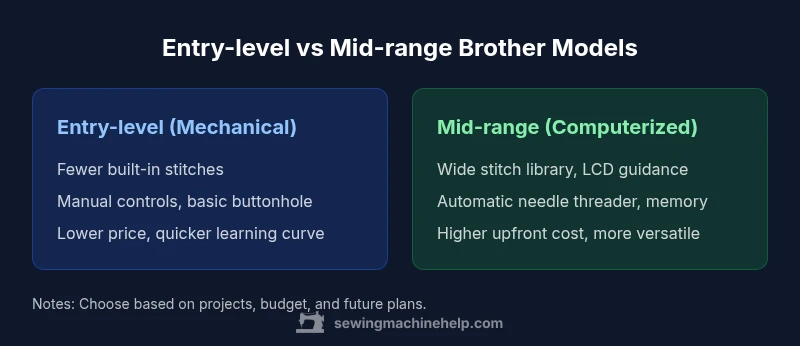
The first big decision when comparing Brother sewing machines is whether to choose a mechanical, non-computerized unit or a computerized model. Mechanical Brother machines tend to emphasize simplicity, durability, and predictable behavior. They rely on dials, levers, and foot pedal control, which many traditional sewers prefer for the tactile feedback and direct feedback loop. Computerized Brother machines, by contrast, add a selection of built-in stitches, automatic needle threading, memory for repeat projects, and sometimes adaptive feed controls. For intensive beginners who plan to tackle varied fabrics, a computerized model can shorten setup time and reduce mistakes; for purists who sew as a hobby and value low maintenance, mechanical options often deliver better reliability with less that can go wrong. The choice should align with your comfort level, your typical projects, and how much you value automation.
Key features to compare when evaluating Brother machines
When evaluating Brother machines, focus on stitch options, ease of setup, and accessory compatibility. Look for the breadth of built-in stitches, including utility, decorative, and quilting options. Consider whether the machine offers an automatic needle threader, auto-float tension, and memory settings for saved projects. Check threading paths and bobbin loading systems for simplicity, as quick access can save time on longer projects. Free-arm capability is a must for cuffs, sleeves, and trousers, while an adjustable presser foot pressure helps with delicate fabrics. Finally, assess the availability of attachments such as walking feet, edge stitch feet, and bias binder feet. These factors collectively determine whether a model is better suited to basic repairs or more ambitious sewing plans.
Build quality and durability across entry-level and mid-range lines
Build quality often tracks with price. Entry-level mechanical Brother machines frequently use sturdy metal components in critical areas, but casing materials may be lighter and the plastics less dense. Mid-range computerized models typically introduce more robust metal frames and reinforced internal supports to handle longer runs and heavier fabrics. The durability of any machine also hinges on maintenance habits and how often you service the machine. Brother’s design philosophy emphasizes serviceability and spare parts availability, which translates into easier repairs or replacements amid busy sewing seasons. The key takeaway for buyers is to test for smooth movement, stable vibration, and consistent stitch formation across a range of fabrics during a hands-on trial.
Stitch library and fabric handling in Brother machines
Stitch library breadth matters if you frequently switch between projects. Entry-level Brother models tend to cover essential utility stitches plus a handful of basic decorative options. Mid-range models expand the library with more decorative stitches, quilting stitches, and sometimes embroidery patterns, depending on the configuration. Fabric handling hinges on feed dog design, presser foot options, and tension consistency. You’ll notice better fabric control in mid-range units due to more precise stitch regulation and improved tension adjustment features. If your projects include denim, jersey, lightweight silks, or heirloom fabrics, a mid-range model often delivers smoother operation with fewer thread breaks and better fabric feeding.
Usability features: threading, bobbin, needle, and controls
Usability often dictates long-term satisfaction. Entry-level machines commonly offer a manual needle threader or simple lever, a straightforward bobbin system, and dial-based stitch selection. Mid-range Brother machines typically introduce automatic needle threading, a clearer LED or LCD interface, memory for favorite stitches, and more ergonomic controls. The threading path should be intuitive, with a clear path from needle to thread spool. Bobbin loading is either front-load or drop-in, which affects ease of access during busy projects. If you depend on quick setup for consistent results, the enhanced usability features in mid-range models can reduce setup time and minimize mistakes, especially for beginners expanding into new techniques.
Maintenance, service, and parts availability
Ongoing maintenance is essential to extend the life of any sewing machine. Regular cleaning to remove lint and dust, timely needle changes, and periodic oiling (as recommended by the manual) keep Brother machines running smoothly. Parts availability is typically strong for Brother because it is a popular consumer brand with wide service networks, manuals, and tutorial resources. Sewing Machine Help emphasizes following the official maintenance schedule rather than improvising repairs, as improper care can void warranties. If you keep to the manufacturer’s guidelines and seek authorized service when needed, a Brother machine can remain a dependable workhorse for years of hobby sewing and occasional professional projects.
Pricing, value, and feature trade-offs
Pricing for Brother sewing machines generally spans from entry-level to mid-range, with corresponding changes in features and performance. Entry-level models emphasize affordability and reliability for everyday tasks, often at a lower upfront cost. Mid-range machines deliver broader stitch libraries, automated features, and more robust durability, justifying a higher price. It's essential to map your project goals to budget and expected usage. If you anticipate a mix of quilting, home décor, and garment construction, a mid-range model typically offers better long-term value by reducing setup time and expanding creative options. Always compare not just the sticker price, but also the cost of accessories, maintenance, and potential upgrades over the machine’s expected life.
Real-world project scenarios: what to expect
In everyday projects, a mechanical entry-level model handles hems, repairs, and simple garments with competence. When you begin quilting or decorative sewing, a mid-range computerized machine shines with more stitch options, automatic features, and better fabric control. Embellishment projects like appliqué benefit from a broader stitch library and more precise feed control in higher-tier models. The key is to choose a machine whose strengths align with your most common tasks. If you often work with heavyweight fabrics, test the machine’s ability to handle denim and canvas without skipping stitches. If you frequently switch between fabrics, the mid-range option’s speed and stability are noticeable advantages.
Testing and trial: how to evaluate in-store
Before committing, test a Brother machine with your typical fabrics and tasks. Check how smoothly it feeds, how easily you thread the machine, and whether the foot pedal response matches your pace. Run several stitches across different fabrics to observe stitch consistency, tension balance, and needle performance. Assess the machine’s noise level, vibration, and portability if you travel or attend workshops. In-store trials are your best chance to gauge whether the model’s user interface feels intuitive and whether the included accessories meet your project needs. Remember to ask about warranty terms, service options, and eligibility for any bundled starter kits that can smooth your learning curve.
Common buyer mistakes and how to avoid them
Common mistakes include overemphasizing stitch count rather than real-world utility, ignoring foot compatibility for quilting or garment work, and underestimating maintenance needs. Another pitfall is buying a machine solely for a single project type without considering future plans; a mid-range model can grow with you as your skills expand. Failing to test machine speed control and fabric handling on your typical fabrics is also a missed opportunity. Finally, neglecting to verify the warranty and service network can lead to avoidable downtime. By focusing on actual use cases and a realistic maintenance plan, you’ll choose a Brother that lasts.
Getting the most from your Brother machine after purchase
Once you own a Brother sewing machine, invest time in a proper setup routine: clean the bobbin area, oil as directed, and keep the needle sharp. Maintain a regular cleaning schedule and replace needles according to fabric type and project frequency. Build a small library of go-to stitches for common tasks, and save templates or memory settings for your most-used configurations. Join community forums and check manufacturer tutorials for troubleshooting tips. With consistent care and a clear plan for projects, your Brother machine becomes a versatile instrument capable of handling everything from quick alterations to more advanced sewing and quilting projects.
Comparison
| Feature | Entry-level Brother (mechanical) | Mid-range Brother (computerized) |
|---|---|---|
| Stitch library | Limited basic stitches | Wide library including decorative and quilting stitches |
| Needle threading | Manual threading, basic guides | Automatic needle threader and guided paths |
| LCD/display | None or simple indicator | Full-color LCD with stitch selection and memory |
| Control interface | Dial-based, tactile controls | Button/press-based with preset memory |
| Bobbin system | Front-loading or drop-in | Drop-in top-loading with smoother path |
| Best for | Beginners and learning tasks | Versatile projects incl. quilting and light embroidery |
Strengths
- Clear price-to-feature balance for many home sewists
- Wide availability of parts and service for Brother
- Upgrading from basic to more features is straightforward
- Mid-range models offer more consistency and ease of use
Negatives
- Entry-level models may lack advanced features and accessories
- Mid-range models cost more upfront and require learning
- Some advanced features may add complexity for true beginners
Mid-range computerized Brother model generally provides the best overall value for most home sewers
For beginners, start with an entry-level mechanical if price matters; otherwise, choose a mid-range to access more stitches and conveniences. The Sewing Machine Help team’s verdict is to match features to actual use and future plans.
Your Questions Answered
What is the key difference between entry-level and mid-range Brother machines?
The entry-level option emphasizes basics and affordability, while the mid-range adds a broader stitch library, automated features, and smoother fabric handling. The choice depends on your project variety and how much automation you want on a regular basis.
Entry-level focuses on basics and price; mid-range adds more stitches and automation for broader projects.
Is a computerized Brother model worth the extra cost for a beginner?
For beginners planning to explore multiple fabrics and projects, a computerized model can reduce setup time and mistakes. If you expect to stick to simple tasks, a mechanical model may suffice and save money.
Computerized models help with variety and consistency, but assess your project plans first.
Can I upgrade from an entry-level to a mid-range model later?
Yes, upgrading later is common as skills grow. Ensure your current machine uses compatible accessories or plan for a different foot kit and embroidery options if you anticipate expansion.
Upgrading later is common; check accessory compatibility and project goals.
What maintenance does a Brother machine require on a schedule?
Follow the manufacturer’s schedule: clean lint from the bobbin area, oil only where specified, replace needles regularly, and service the machine through authorized centers when needed. Regular upkeep prevents skipping stitches and prolongs life.
Clean and oil as directed, replace needles often, and use authorized service when needed.
Which Brother models are best for quilting beginners?
For quilting newcomers, look for a mid-range computerized model with a larger harp space, multiple quilting stitches, and good fabric handling. Access to a walking foot and other quilting feet can be decisive.
Quilting beginners benefit from more space, more stitches, and compatible feet.
What warranty and service options should I expect with a Brother machine?
Expect a standard manufacturer warranty with regional service options. Check what is covered (parts, labor, and electronics) and whether service centers are convenient for your location. Consider extended coverage if you plan heavy use.
Look for parts and labor coverage and accessible service centers; extended coverage can help if you sew often.
The Essentials
- Compare feature sets across price bands
- Prioritize machines with automatic threading and a tactile interface
- Test stitch quality on common fabrics before buying
- Verify warranty and service options in your region
- Choose based on your typical projects and future goals