Sewing Machine and Embroidery Combined: A Practical Buyer's Guide
A practical buyer's guide comparing sewing machine and embroidery combined units. Learn features, workflows, costs, and maintenance to decide between all-in-one and dedicated embroidery setups.


Choosing a sewing machine and embroidery combined unit offers space-saving versatility for home sewers. This quick comparison outlines when a combo model makes sense, how it differs from dedicated embroidery machines, and what trade-offs to expect in features, cost, and workflow. It also highlights which projects suit a single machine and where you might prefer separate equipment for depth and scale.
What does a sewing machine and embroidery combined setup mean for home sewers?
A sewing machine with embroidery capability, or a modular embroidery unit that attaches to a compatible machine, creates a versatile tool set. The phrase sewing machine and embroidery combined describes devices or configurations that mix stitching with decorative embroidery in a single workflow. For many home sewists, this means fewer machine swaps, less table space used, and a smoother design-to-creation process. According to Sewing Machine Help, the most compelling value comes from seamless design transfer, reliable hooping, and consistent stitch quality across both tasks. The keyword sewing machine and embroidery combined is not just marketing; it describes a practical approach that aligns with hobbyists' goals of creativity, efficiency, and skill-building. Home users gain flexibility to switch from a basic seam to a decorative fill without exiting the same workflow, which can simplify practice routines and speed up project turnaround.
Hybrid vs dedicated embroidery: what truly differentiates them?
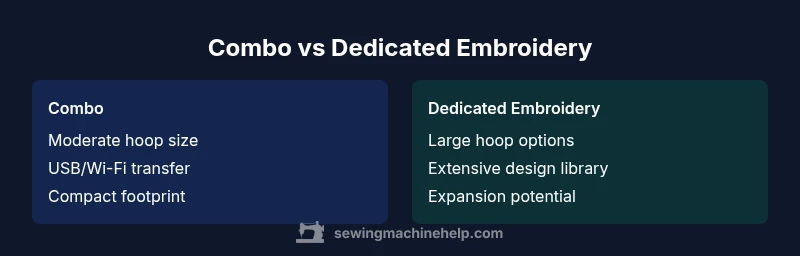
When choosing between a sewing machine with embroidery capabilities and a separate embroidery-only machine, several factors matter: hoop size, design library, speed, and software compatibility. A combined system trades some embroidery space for convenience, while a dedicated embroidery machine often provides larger embroidery areas and more expansive design collections. By framing this as a buying decision, you can map your projects to the strengths of each approach. The Sewing Machine Help team notes that the biggest differentiator is control over embroidery area and design depth; if you plan frequent large motifs, a standalone embroidery unit may be more scalable. Conversely, if space and workflow simplicity are your priorities, a capable combo can cover most hobby projects.
Key features to evaluate in a sewing machine with embroidery integrated
- Embroidery area and hoop compatibility: look for a machine that supports the hoop sizes you use most, and check if optional hoops are readily available.
- Built-in stitches and embroidery designs: count how many stitches and patterns come preinstalled and whether you can import more designs.
- Software integration and updates: assess USB/Wi-Fi capabilities, update paths, and compatibility with common formats (PES, DST).
- Speed, needle system, and threading: high-speed sewing plus smooth embroidery performance requires stable bobbin tension and a reliable needle system.
- User interface and learning curve: consider touchscreens, guided tutorials, and in-product assistance.
- Portability and footprint: measure footprint relative to your workspace.
Practical workflow: from design to finished piece
- Design selection and transfer: choose a design, load it via USB or wireless transfer, and verify file compatibility. 2) Hoop preparation: hoop and stabilize the fabric to prevent fabric shifting or puckering. 3) Stitch sequence: start with sew steps for construction, then switch to embroidery mode for decorative work or vice versa, depending on the project. 4) Color changes and bobbin management: plan color changes ahead of time, load matching threads, and keep a spare bobbin for large designs. 5) Finishing touches: trim excess stabilizer, press lightly, and assess thread tension. Such a workflow minimizes rethreading and keeps projects moving efficiently.
Software, fonts, and compatibility considerations
- Internal libraries vs external software: many combo machines include a core library, but advanced fonts and designs often require external software or a USB transfer workflow. - File compatibility: common embroidery file formats (PES, DST, EXP) should be supported, with straightforward import options. - Updating and cloud access: some models offer online updates or design marketplaces; verify stability and user support before purchase.
Maintenance, reliability, and warranty implications
Maintenance for sewing and embroidery in one unit is a mix of sewing machine upkeep and embroidery head care. Regular needle changes, lint removal, and bobbin timing checks are essential. Use the correct stabilizers and hooping methods to reduce wear on the embroidery module. Check the warranty to see if embroidery components are covered and whether software updates are included. A reliable support channel, ideally from the manufacturer, can save time when you encounter alignment or tension issues.
Cost, value, and budgeting for a sewing machine and embroidery combined
Budget-friendly combinations exist, but most models balance features and price with embroidery area, speed, and design depth. A considered approach divides models into entry-level, mid-range, and premium tiers, focusing on the size of projects you expect to tackle, the.level of software interoperability you require, and the space you have available. Rather than focusing on a single price, weigh long-term value: what you gain in time saved, design flexibility, and potential for growing into larger motifs as skills expand.
Real-world use cases: who benefits most
Beginners who want a single machine to learn both sewing and decorative embroidery benefit from the all-in-one approach. Small studios and hobbyists with limited space appreciate the compact footprint and minimal setup changes. Quilters, garment makers, and home decor enthusiasts who regularly produce small to medium-sized embroidery panels will find a combo machine convenient. For extensive, large-format embroidery, or high-volume production, dedicated embroidery hardware may deliver the best performance and scalability.
How to test a combo machine in-store or at home
When evaluating a sewing machine and embroidery combined unit in-store, test both sewing and embroidery modes with fabrics similar to your typical projects. Check hoop stability, stitch quality, color changes, and how the device handles thread breaks. Bring a few designs you plan to use and verify transfer reliability from USB or wireless methods. If testing at home, request a trial period if possible, and document any issues with thread tension, noise, or machine vibrations to compare with other options.
Comparison
| Feature | Combo Sewing Machine & Embroidery | Dedicated Embroidery Machine |
|---|---|---|
| Embroidery Area (Max Hoop Size) | Moderate (4"x4" to 5"x7" typical) | Large (up to 6"x12" or more in many dedicated units) |
| Design Library & Customization | Built-in options, moderate expansion | Extensive library with expansive customization and fonts |
| Software & Connectivity | USB transfer, basic onboard editing | Advanced software compatibility, Wi-Fi, cloud access |
| Cost Range (conceptual) | Budget-friendly to mid-range | Mid-range to premium |
| Best For | Space-conscious crafters and beginners | Quilters and professionals needing larger motifs |
| Maintenance & Upgrades | Simpler maintenance for dual-function units | Upgrades and modules may be more extensive |
Strengths
- Space-saving all-in-one solution
- Lower upfront investment vs two separate machines
- Intuitive for beginners who want both sewing and embroidery
- Faster switching between tasks in small studios
Negatives
- Embroidery area may be smaller than dedicated units
- Embroidery features can be less deep than standalone machines
- Upgrade paths can be more limited by the model
- Maintenance can be more complex due to dual functionality
A sewing machine and embroidery combined unit offers strong value for hobbyists and small studios seeking space-efficient versatility.
For most crafters, the all-in-one approach balances space, cost, and usability. Choose a combo if you want convenience; opt for a dedicated embroidery setup if you need large designs and maximum design depth.
Your Questions Answered
What does 'sewing machine and embroidery combined' mean in practical terms?
It refers to a device or setup that supports both sewing and embroidery tasks within a single workflow. You can sew garments or seams and then switch to embroidery without swapping machines or altering the workspace.
A single machine that can both sew and embroider, so you don't need two separate devices.
Can I use embroidery designs with a regular sewing machine?
Some sewing machines include embroidery functionality, but true embroidery often requires a dedicated module or feature set. Check your model’s capabilities and supported design formats before planning projects.
Some sewing machines can embroider, but you’ll want to verify the model’s capabilities first.
Do combo machines support large embroidery areas?
Combo machines typically offer moderate embroidery areas. If large-format embroidery is a priority, compare with dedicated embroidery units that advertise bigger hoop sizes.
They usually have moderate hoop sizes; for large designs, consider a dedicated unit.
Are there good software options for upgrading designs on a combo unit?
Yes, many models support external software via USB, with compatibility for common formats. Check updates, file transfer methods, and whether you can expand fonts and designs easily.
External software options exist; verify file formats and update paths.
Is a combo machine suitable for beginners?
Yes, a well-chosen combo can be friendly for beginners by combining two tasks in one tool. Start with simple designs and gradually explore more complex embroidery projects.
Yes, it can be beginner-friendly if you start with simple designs.
What’s a quick test to compare two machines in-store?
Test sewing and embroidery on fabrics similar to your projects, check hoop stability, tension, and transfer reliability. Bring sample designs and ask about warranty and service.
Test both sewing and embroidery with samples and check tension and transfer.
The Essentials
- Assess space and budget before buying.
- Evaluate embroidery area and design depth.
- Test transfer methods and software compatibility.
- Consider ongoing maintenance for dual-function devices.
- Choose based on typical projects and growth plans.