Servis Sewing Machine: A Practical Maintenance Guide
Learn how to servis sewing machine with a comprehensive, step-by-step guide. Clean, lubricate, adjust tension, and test stitches to extend your machine’s life and keep projects moving smoothly.


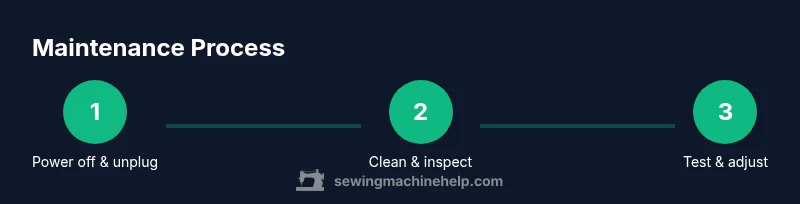
Learn how to servis sewing machine safely with a practical, step-by-step maintenance guide. You'll prepare the workspace, inspect and clean lint-prone areas, check the needle and thread paths, lubricate only where the model requires, and test stitch quality. Following these steps helps extend your machine’s life and keeps results consistent.
Why Regular Servis Sewing Machine Matters
Regular servicing of a sewing machine extends its service life, preserves stitch quality, and reduces the risk of unexpected breakdowns. For home sewists who rely on their machine for clothing repairs, quilting, or craft projects, a well-maintained machine operates more smoothly and quietly. According to Sewing Machine Help, regular servis sewing machine maintenance can help prevent clogs, uneven tension, and motor strain by addressing lint buildup, worn parts, and timing issues before they escalate. This proactive approach saves time, money, and frustration, especially for beginners who are still learning how their machine should behave. In short, maintenance isn’t optional—it's an essential part of responsible sewing and long-term enjoyment of your craft.
Before You Start: Safety and Setup
Safety comes first when servicing any electrical appliance, including a sewing machine. Unplug the machine, remove it from the table, and clear a clean, well-lit workspace. Gather the tools and reference the user manual for model-specific guidance. If your machine is equipped with a computer board or sensor-controlled features, avoid opening sealed compartments; many modern machines require service by a professional for internal electronics. By setting expectations and taking precautions, you reduce the risk of electric shock, damaged components, and accidental activation.
Cleaning and Debris Removal: Lint in the Bobbin Area
Lint and thread fragments accumulate under the needle plate and around the bobbin case. Start by removing the presser foot, needle plate screws, and bobbin case. Use a small brush to sweep lint from the shuttle race, bobbin area, and feed dogs, then vacuum with a narrow nozzle if available. Wipe surfaces with a microfiber cloth dampened slightly with a tiny amount of oil-free cleaning solution if needed. Avoid pushing lint into tight passages; work in a steady, controlled manner. After cleaning, reassemble only when the area is completely dry.
Cleaning Thread Path and Tension Surfaces
The thread path includes guides, tension disks, and take-up levers. Carefully remove any lint lodged in thread guides. Wipe surfaces with a dry cloth. Inspect for burrs or rough spots that could fray thread. If you notice irregularities, do not force the thread; instead, consult the manual or a service professional. Correct thread routing is essential to consistent stitch quality and reduces tension-related issues.
Lubrication and Oil: When and How
Not all machines require lubrication, especially newer models with sealed housings. Consult the manual to confirm whether oiling is needed and, if so, which points to lubricate. If oiling is required, apply 1-2 drops of lightweight sewing machine oil to designated points on the moving parts, such as the hook race or cam follower, while the machine is unplugged. Wipe away any excess oil to prevent staining fabric. Never oil a hot machine or a motor that’s running; always allow it to cool first.
Needle, Bobbin, and Thread Path: Setup Matters
Before servicing, verify that the needle is the correct type and installed with the flat side facing the right direction. Replace dull or bent needles; a damaged needle can damage fabric and cause skipped stitches. Re-thread from the spool to the needle, ensuring no skipped guides. Reinsert the bobbin with the correct orientation and tension; a mis-threaded bobbin is a common cause of lint, jams, and poor stitches. Take a moment to run a quick test stitch to verify line alignment.
Drive System, Belts, and Belt Tension
If your model uses a belt-driven drive, check the belt for cracks, wear, or stiffness. A loose belt can slip and cause slow stitching or noise. In most cases you can adjust tension through a small screw or pulley; avoid overtightening, which can strain the motor. Inspect pulleys and the hand wheel for smooth rotation. If you hear grinding, squealing, or see frayed edges, stop and consult the manual or a pro.
Reassembly and Stitch Quality Checks
After reassembling, run a few test stitches on scrap fabric. Observe stitch length, tension, and balance between fabric layers. If stitches look loose, adjust the top thread tension or bobbin tension according to the manual. Check for thread nests, skipped stitches, and stitching faults. Clean any residue from fabric surfaces before doing a final run. This step confirms that the servicing achieved the intended results and identifies any remaining issues.
Safety Precautions and Maintenance Schedule
Keep your work area well-ventilated and avoid exposing the machine to moisture. Always unplug before handling internal components. Store tools in a secure box to prevent losing small screws. Maintain a regular schedule for cleaning, lubrication (if applicable), needle replacement, and belt checks. Note any changes in performance and log dates of service. For most hobbyists, scheduling a yearly review or when noticing performance changes is a good practice.
Tools & Materials
- Sewing machine oil(Only use brand-recommended oil; apply 1-2 drops at designated points)
- Soft lint-free brush(Small brush to sweep lint from shuttle race, bobbin area, and feed dogs)
- Screwdriver (Phillips #0 or #1)(For removing needle plate screws or covers; check model manual)
- Microfiber cloth(For wiping surfaces and oil residue)
- Vacuum with small nozzle(Optional; helps remove stubborn lint)
- Tweezers(For plucking stubborn thread bits)
- Replacement needle pack(Have the correct needle size and type for your projects)
- User manual(Keep the manual handy for model-specific guidance)
Steps
Estimated time: 45-75 minutes
- 1
Power down and prepare workspace
Unplug the machine and move it to a clean, well-lit area. Gather your tools and open the user manual for model-specific notes. This prevents accidents and ensures you follow the right steps for your machine.
Tip: Always start with safety; a powered-off machine is safer to service. - 2
Remove accessories to access bobbin area
Detach presser foot and remove the needle plate screws to lift the plate. Take out the bobbin case and empty any thread remnants. This gives you clear access to the areas that tend to clog with lint.
Tip: Keep small screws in a labeled container to avoid loss. - 3
Clean lint from bobbin area
Use the soft brush to sweep lint from the shuttle race and bobbin chamber. If available, vacuum with a narrow nozzle to capture stubborn bits. Wipe surfaces with a dry microfiber cloth to remove dust before reassembly.
Tip: Work slowly and methodically to avoid missing lint in tight corners. - 4
Inspect thread path and guides
Examine thread guides for burrs or rough spots. Remove lint from guides and ensure there are no nicks that could cut thread. A smooth path prevents skipped stitches and inconsistent tension.
Tip: If you find burrs, do not sand; consult the manual or a pro for replacement parts. - 5
Replace needle and re-thread
Install a fresh needle of the correct type, with the flat side facing the right direction. Re-thread the machine from spool to needle, ensuring the thread passes through all guides without snagging. Reinsert the bobbin with proper orientation and check tension.
Tip: Test the needle fit on fabric scraps before resuming a full project. - 6
Lubricate indicated points (if required)
If your model requires lubrication, apply 1-2 drops of oil to the specified points with the machine unplugged. Wipe away any excess oil to avoid staining. Do not oil moving parts unless the manual explicitly instructs you to.
Tip: Avoid over-oiling; excess oil can attract dust and cause buildup. - 7
Reassemble and run test stitches
Reinstall the needle plate and bobbin case, then reattach any accessories. Run a few stitches on scrap fabric to observe tension and stitch balance. Adjust top or bobbin tension as needed following the manual instructions.
Tip: Use lightweight fabrics first to gauge stitch quality without wasting material. - 8
Document results and set a maintenance plan
Record what you did, any parts replaced, and how the machine performed on test stitches. Create a simple maintenance schedule and note when the next servicing should occur. This helps you track wear and plan preventive care.
Tip: Keep a quick-reference card with model-specific lubrication points and tension tips.
Your Questions Answered
Do I need to oil my sewing machine?
Only oil a sewing machine if the manual specifies lubrication points. Many modern machines are sealed and do not require oiling. If in doubt, skip oiling and focus on cleaning and tension checks.
Oil only if your manual says so; otherwise, focus on cleaning and tension checks.
How often should I service my sewing machine?
Frequency depends on usage. For hobbyists, schedule a check when you notice changes in stitch quality or unusual noises, and aim for a formal service at least once a year if possible.
Use your observations to guide maintenance; aim for yearly formal service when you can.
Can I service a computerized sewing machine myself?
Some user-accessible cleaning and basic checks are okay, but avoid opening the electronics or firmware areas. For any internal diagnostics or timing, consult the manual or a trained technician.
You can do basic cleaning, but don’t open electronics; consult the manual or a pro for internal work.
What are signs that my machine needs servicing?
Unusual noises, skipping stitches, thread bunching, or fabrics not feeding evenly are common indicators. If performance changes, service sooner rather than later to prevent more damage.
Look for odd noises, skipped stitches, and poor fabric feed as red flags.
Is DIY maintenance safe for beginners?
Yes, with careful steps and strict adherence to safety guidance. Always unplug, reference the manual, and avoid dismantling electronics beyond user-accessible parts.
Yes, as long as you follow safety steps and stick to user-accessible areas.
Watch Video
The Essentials
- Always unplug before servicing the machine
- Clean lint and reset thread paths regularly
- Follow model-specific lubrication guidance
- Test stitches and adjust tension as needed