Brother SE1900 Sewing & Embroidery Machine: A Practical Guide
Learn to set up, thread, hoop, sew, and troubleshoot the Brother SE1900 sewing and embroidery machine with practical, beginner-friendly guidance. Perfect for beginners.


Using the Brother SE1900 sewing and embroidery machine, you will learn to set up the unit, thread the top and bobbin, attach the embroidery unit and hoop, and switch between sewing and embroidery modes. This guide covers basic safety checks, routine maintenance, and practical steps to complete your first design. By following these steps, you’ll gain confidence and keep the machine running smoothly for projects at home.
Overview of the Brother SE1900: Sewing and Embroidery in One Machine
The Brother SE1900 is designed for home crafters who want the flexibility of both sewing and embroidery in a single, compact package. It combines a broad selection of built-in stitches with an embroidery module that accepts hoops and designs loaded from a USB drive or design library. While you won’t find every possible feature in one machine, the SE1900 strikes a balance between ease of use and capability, making it a strong choice for beginners who want to explore decorative stitching, monogramming, and small embroidery projects. According to Sewing Machine Help, this model integrates user-friendly controls with a color touchscreen, clear on-screen guidance, and intuitive mode switching that helps newcomers avoid common setup mistakes. The Sewing Machine Help team also notes that keeping the embroidery unit properly attached and using the right hoop and stabilizer can significantly improve design alignment and fabric handling.
In practical terms, you’ll enjoy straightforward threading, a responsive bobbin system, and a design workflow that lets you toggle between sewing and embroidery without reconfiguring the whole machine. The device’s design emphasizes accessibility, with quick-access controls for speed, stitch type, and unit selection. For home sewists, the SE1900 offers a pathway to learn foundational techniques such as accurate seam allowance, fabric stabilization, and compatible thread choices, while gradually exploring more complex embroidery designs. This blend of features can empower you to execute projects—from simple hems to personalized gifts—without needing multiple standalone machines. The goal is steady improvement, consistent results, and the confidence to take on new textile ideas as your skills grow.
Setup and Basic Wiring: Power, Foot, and Presser
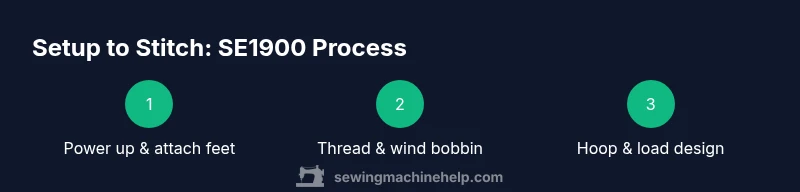
Before you begin, choose a sturdy, well-lit work surface and ensure you have access to a proper power source. The first step is to place the machine on a stable table, away from drafts and moisture, and connect the power cord to a grounded outlet. If your model uses a separate foot controller, plug it into the dedicated port and test the pedal with the machine powered off to ensure responsiveness. Always verify that the machine is unplugged when mounting feet, removing the embroidery unit, or performing maintenance. A quick check of the presser foot and feed dogs ensures fabric will advance smoothly during both sewing and embroidery.
For embroidery mode, attach the embroidery unit securely, then attach the hoop according to the size and design you’ve chosen. In the sewing mode, attach the appropriate foot for your stitch and practice a few stitches on scrap fabric to confirm tension settings and thread path. Remember to keep a clear work area and organize tools so you can reach the spool pin, thread path, bobbin case, and needle without fumbling. As Sewing Machine Help emphasizes, consistency in setup reduces the likelihood of thread snarl, fabric puckering, or misalignment during a project. A tidy workspace supports better stitch quality and a smoother transition between modes.
Threading and Bobbin: Dual-Threading for Sewing and Embroidery
Threading the upper path and winding a bobbin properly are foundational skills for both sewing and embroidery. Start by raising the presser foot to release tension and allow the thread to feed smoothly from the spool. Place the spool on the spool pin, guide the thread through the tension discs, and follow the machine’s color-coded path to the presser foot. When threading the bobbin, use a clean bobbin and wind it evenly, then insert it into the bobbin case with the thread direction correct for your machine model. Pull a few inches of thread through the bobbin area to ensure it feeds correctly when starting a stitch.
Keep the thread ends by your needle clear until you finish a few stitches to prevent tangling. It’s helpful to do a quick test stitch on a scrap fabric to verify that both the top thread and bobbin thread are pulling together, creating balanced tension. If you notice thread nests on the bottom or top, stop and recheck the threading path, spool height, and needle type. Sewing Machine Help notes that consistent threading reduces skipped stitches and improves fabric feed, especially when moving between dense fabrics and sheer materials.
Embroidery Unit, Hoops, and Design Loading
Embroidery begins with attaching the embroidery unit securely and choosing a hoop size that matches your fabric. Install stabilizer underneath the fabric, then hoop your material with a firm but not overly tight grip. Load your design via USB or internal memory, selecting it on the color touchscreen. Before stitching, verify the design’s origin marks align with the hoop’s center and adjust the needle position to ensure the first stitch lands where intended. If your design is off-center, re-hoop and re-check fabric tension, stabilizer, and hoop alignment.
Be mindful of fabric weight and stabilization needs; lighter fabrics benefit from cut-away stabilizers, while woven or dense fabrics may require tear-away stabilizers. For beginners, start with simple shapes or letters to understand how the design translates from screen to fabric. Sewing Machine Help research suggests that practicing with a few small, low-stress designs helps you learn hoop placement, screen navigation, and stitch density without wasting material.
Maintenance, Care, and Safe Use
Consistent maintenance is essential for long-term performance of the Brother SE1900. After sessions, clean the feed dogs, bobbin area, and under the needle plate with a small brush to remove lint and fabric fibers. Wipe away dust from the exterior and store the machine in a dust cover when not in use. Keep the threading path clear and dry; moisture can affect thread behavior and tension. If you notice unusual noises or binding, unplug the machine and inspect for loose screws, lint buildup, or misthreaded components.
Regularly consult the user manual for recommended maintenance intervals and safe lubrication practices. If your model requires lubrication, apply oil sparingly to the specified points and remove any excess. Remember to update the machine’s software or firmware only through official channels when available.
Common Troubleshooting: Quick Fixes for Frequent Issues
When things go wrong, a structured approach helps. If stitches skip or embroideries appear off, recheck threading, needle size, and hoop alignment. If the fabric puckers, re-evaluate stabilizer choice and fabric tension, and consider using a lining or heavier stabilizer. Thread breaks during embroidery often stem from a bent needle or a rough thread path; replace the needle and rethread carefully. If the design appears fuzzy or out of scale, confirm the hoop is level, the fabric is taut, and the stabilizer is appropriate for the design density.
For connectivity and media transfer issues, verify the USB drive compatibility and the design file format. If you encounter persistent problems, consult the manual, perform a reset of the design screen, or contact customer support. Remember that gradual, deliberate testing with scrap fabric minimizes waste while you learn.
Practical Features for Beginners: Getting Comfortable with the SE1900
A core advantage of the SE1900 is how it simplifies entry into mixed-media sewing. The color touchscreen provides clear navigation for selecting stitches or embroidery designs, while a dedicated embroidery unit streamlines mode switching. Beginners often appreciate built-in help messages and on-screen tutorials that guide you through basic tasks, from threading to stabilizer selection. As you gain familiarity, you can branch into decorative stitches, monograms, and small ornament designs. The machine’s design supports consistent execution by encouraging careful hooping, precise fabric alignment, and thoughtful stabilizer use.
Patience matters: start with simple projects, test each step, and gradually increase complexity as you gain confidence. With steady practice and a willingness to experiment, you’ll unlock more creative possibilities and produce polished results for gifts, garments, and home décor. The Sewing Machine Help team emphasizes that consistent care and methodical practice are the best paths toward reliable outcomes.
Next Steps: Practice, Projects, and Personal Growth with Your SE1900
Now that you’ve covered setup, threading, embroidery, and maintenance, it’s time to plan a small project that blends sewing and embroidery. Begin with a simple tote bag or a decorative napkin set to practice alignment, fabric choices, and thread compatibility. Track your progress by saving design files and notes about stabilizer selections for future reference. As you build competence, you’ll discover how to combine different stitches and embroidery motifs into cohesive, personalized items. Remember, the goal is gradual improvement, consistent results, and enjoyable learning experiences.
Tools & Materials
- Power cord and foot controller(Plug into a grounded outlet; verify cord condition.)
- Embroidery hoops (various sizes)(Choose hoop size appropriate for your design and fabric.)
- Spool pins and thread stand(Organize spools to prevent tangling.)
- General sewing needles (size 14/90)(Replace after every few projects.)
- Bobbin cases and pre-wound bobbins(Use compatible bobbins for smoother tension.)
- Lint brush and cleaning cloth(Clean lint from bobbin area after sessions.)
- Sewing machine oil(Lubricate only where the manual indicates.)
- Stabilizer (tear-away/cut-away)(Essential for embroidery on woven fabrics.)
- Embroidery threads (rayon/polyester)(Match weight to design and fabric.)
- Small screwdriver set(For minor adjustments if needed.)
Steps
Estimated time: 90-120 minutes
- 1
Power up and prep
Place the machine on a stable surface, connect the power, and test the foot controller. Raise the presser foot and ensure the workspace is clear before starting any threading. This initial setup helps prevent unexpected fabric movement and loosening of parts during operation.
Tip: Keep the area tidy and line up the power cord away from the foot pedal path to avoid accidental unplugging. - 2
Thread the upper path
Place the spool on the spool pin, guide the thread through the guides and tension discs, then down toward the presser foot. Follow the color-coded thread path shown on the machine display to ensure proper tension for both sewing and embroidery tasks.
Tip: Do a quick test stitch on scrap fabric to verify the upper thread flows smoothly without snagging. - 3
Wind and insert the bobbin
Wind a bobbin according to the manual and insert it into the bobbin case with the thread ending facing the correct direction. Draw the thread through the guide to engage the take-up mechanism and confirm it feeds properly when you pull gently.
Tip: Use a new needle and clean lint from the bobbin area before inserting to prevent jams. - 4
Thread for sewing mode
With the presser foot lifted, thread the needle from front to back, thread the bobbin, then lower the presser foot. Choose a simple stitch to test fabric compatibility and to confirm tension balance between top and bottom threads.
Tip: Use a lightweight fabric first to gauge tension before moving to denser materials. - 5
Attach embroidery unit and hoop
Securely attach the embroidery unit, then place the hoop around your fabric with stabilizer underneath. Align the hoop so the design sits at the center of the working area, as misalignment will show up as skewed embroidery on the final piece.
Tip: Choose a stabilizer appropriate for the fabric to prevent puckering during embroidery. - 6
Load a design and set origin
Load a simple design via USB or built-in library, then select it on the touchscreen. Calibrate the hoop origin so the first stitch lands where you expect. Confirm thread colors and density, especially for denser motifs.
Tip: Keep a small scrap piece underneath your hoop to check alignment before stitching on your final fabric. - 7
Test stitch and adjust
Run a short test stitch on scrap fabric to verify alignment, tension, and stitch quality. If issues appear, adjust the needle, rethread, and re-hoop with proper stabilizer. A successful test saves fabric and time later on.
Tip: If thread breaks, rethread both paths and verify the needle size matches the thread weight. - 8
Begin sewing or embroidery
Start your project with careful fabric handling and slow speed at first. Gradually increase speed as you become comfortable with the stitch pattern and design details. When finished, remove the hoop, trim threads, and clean the work area.
Tip: Finish by trimming jump threads and conserving fabric by returning to a simple stitch to secure ends.
Your Questions Answered
How do I switch from sewing to embroidery on the SE1900?
To switch modes, attach the embroidery unit and hoop, select embroidery mode on the touchscreen, then load your design. Re-thread if needed and test on scrap fabric before stitching your project.
Switch modes by attaching the embroidery unit and selecting embroidery on the touchscreen, then load your design and test on scrap fabric.
What foot and needle should I use for embroidery compared to sewing?
Use the embroidery foot when embroidering and the standard presser foot for sewing. Select a size 11-14 needle depending on fabric weight, and replace after several projects to prevent skipped stitches.
Choose the embroidery foot for embroidery and a standard foot for sewing, with an appropriate needle size based on fabric.
How often should I oil or service the SE1900?
Refer to the manual for maintenance guidelines. Generally, clean lint after use and service or consult a professional if you notice unusual noises or performance changes.
Check the manual for maintenance. Clean lint after use and seek professional service if you notice performance changes.
Why is embroidery design not aligning in the hoop?
Re-hoop the fabric with stabilizer, verify hoop centering on the design origin, and check that the stabilizer isn’t shifting during stitching. Small misalignments often come from hoop tension or fabric movement.
Ensure the hoop is centered, stabilizer is secure, and the fabric is taut to fix alignment issues.
What accessories come with the SE1900?
Most SE1900 packages include the embroidery unit, hoops, multiple feet, bobbins, needles, thread nets, and a USB connection for design transfer. Always verify exact contents with the seller.
The kit usually includes the embroidery unit, hoops, various feet, bobbins, needles, and USB transfer options.
Can I quilt with the SE1900?
The SE1900 supports basic quilting tasks through sewing functions and decorative stitching. For complex quilting, consider additional tools like walking feet and appropriate stabilizers to help manage bulk and fabric feed.
It can handle basic quilting tasks with the right feet and stabilizers; for advanced quilts you may want more specialized equipment.
Watch Video
The Essentials
- Thread both paths correctly for balanced stitches.
- Switch modes smoothly by attaching embroidery unit and selecting the mode on screen.
- Stabilize fabrics to improve embroidery results.
- Practice with scrap fabric to build confidence before tackling real projects.