How to Change Needle in a Brother Sewing Machine
A practical, step-by-step guide from Sewing Machine Help on safely changing the needle in your Brother sewing machine. Learn which tools you need, how to orient the needle, and how to test stitches to prevent fabric damage.


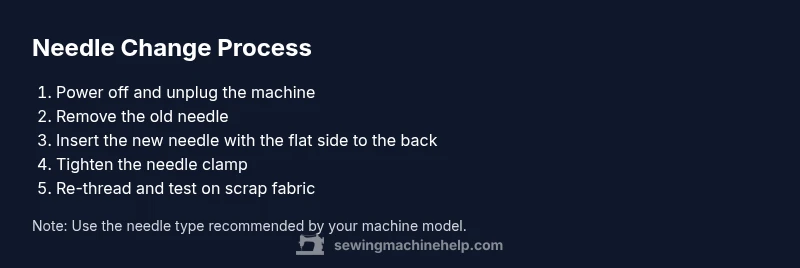
To change a needle on a Brother sewing machine, power off the machine and unplug it. Remove the old needle, insert a new needle with the flat side toward the back, and tighten the needle clamp. Re-thread, then test on a scrap fabric to confirm proper stitches. Always use the needle type and size recommended for your fabric and model.
Why changing the needle matters
The needle is the machine’s most direct connection to your fabric, and a worn, bent, or incorrectly sized needle can ruin a project in minutes. For Brother sewing machines, using the wrong needle or installing it backwards is a frequent cause of skipped stitches, snags, and thread breaks. Regularly inspecting the needle and replacing it when you notice wear keeps stitches smooth and reduces fabric damage. In this section we’ll explore the signs that a needle needs replacing, how needle quality affects performance, and why a simple change can save you time on future projects. You’ll learn how to spot a bent tip, a dull edge, or a burr, and how to avoid common problems like bird-nesting and inconsistent tension. By making needle changes a routine part of your setup, you’ll maintain optimal needle penetration, protect delicate fabrics, and improve overall sewing results. As you're reading, remember that small maintenance steps, like changing the needle, add up to big gains in reliability—especially with the wide range of Brother models used by home sewists today in 2026.
Understanding Brother needle systems
Brother machines use standardized needle clamps across many models, but there are differences in how the needle is seated and secured. The key idea to keep in mind is that the needle must be aligned with the machine’s needle plate and bobbin mechanism to feed fabric correctly. The flat side of most needles faces the back of the machine, and the groove in the needle should line up with the clamp. If the needle is installed backwards, it will not thread, and you may hear loud clicking or see fabric snagging. Also, use the recommended needle type (universal, ballpoint, microtex, or denim) for your fabric and pattern. When in doubt, check your Brother manual for exact specifications and model nuances. With a clear understanding of needle system basics, you’ll know what to look for and how to proceed safely when you need to replace the needle.
Choosing the right needle for fabric and project
Every fabric type benefits from a compatible needle. A dull or wrong-size needle can cause skipped stitches, fabric snags, or torn seams even if your thread tension is set correctly. For light cotton or synthetic blends, choose a sharp, fine needle and test on a small scrap first. For knits, consider a ballpoint needle to avoid damaging the fabric’s stretch. For heavy denims or canvas, a thicker needle with a strong shaft reduces bending. If you are unsure, start with a universal needle and adjust based on stitch quality after a quick test. Remember to inspect the needle’s point and tip before installation; a damaged point can cause invisible holes or pucker on your seam. Always have a few needles in different sizes on hand, so you can switch quickly as you switch fabrics during a project.
Tools and safety basics
Having the right tools on hand makes changing the needle quick and safe. Before you begin, gather a small screwdriver, a pair of sharp scissors or thread snips, a lint-free cloth, and a scrap fabric for test stitches. Ensure the machine is unplugged and the presser foot is raised to relieve tension and give easy access to the needle bar. Use a clean, dry workspace to keep needles from slipping or rolling away. If your model uses a dedicated needle threader, you can either use it or thread manually. Finally, dispose of used needles safely in a container designed for sharps. Following these safety steps minimizes the risk of injury and protects your machine’s internal components.
Step-by-step overview (high-level) before you start
Though the detailed steps are outlined below, it helps to visualize the process before you pick up tools. First, power down and unplug the machine, then locate the needle clamp and prepare the old needle for removal. Next, orient and insert the new needle, ensuring the flat edge faces the back and the groove aligns with the clamp. After securing the needle, re-thread the machine and double-check tension guides. Finally, test on a small scrap to confirm even stitches and fabric feed. Having this mental checklist reduces hesitation and helps you work confidently through the procedure.
How to thread after needle change
Threading briefly after a needle change helps confirm the path is correct and that the machine will sew smoothly. Start by re-threading the top thread through all guides, then insert the thread through the needle eye from front to back. Rewind or reinsert the bobbin if needed and ensure the bobbin thread is properly engaged with the top thread. Run a few quick stitches on scrap fabric to verify that there are no bird-nests or thread breaks. If you notice tension issues, adjust the upper thread or switch to a different needle type. The key is to ensure the thread flows freely through the path and that the needle is fully engaged in the clamp.
Testing and verifying needle installation
With the needle installed and threaded, the final step is a careful test. Start with a small scrap of the same fabric as your project, then sew in straight lines, curves, and a few smaller stitches to observe how the machine handles different directions. Look for balanced thread tension, clean needle penetration, and consistent stitch length. If anything looks off—skipped stitches, loose top thread, or fabric snags—stop, re-check needle orientation, ensure you used the correct needle type, and re-thread from scratch. Keep notes of what fabric and needle worked best for future projects. This practical testing helps you avoid surprises when you start a real garment or project.
Tools & Materials
- Needle pack (size appropriate for your fabric)(Keep several sizes handy for different fabrics)
- Small screwdriver or needle clamp driver(For Brother models with a screw clamp)
- Lint-free cloth or brush(Clean around needle area)
- Tweezers or pliers(To grip the needle safely if needed)
- Scrap fabric for testing(To test stitches after changing needle)
Steps
Estimated time: 15-25 minutes
- 1
Power off and unplug the machine
Always unplug before maintenance. Raise the needle to its highest position and lower the presser foot if possible. Loosen the needle clamp screw with the appropriate screwdriver and carefully remove the old needle without bending it.
Tip: Holding the needle gently reduces the risk of bending it or injuring the hand. - 2
Remove the old needle
Fully remove the needle by pulling it straight down and out from the needle bar. Do not twist the needle as you remove it. Place the old needle in a safe container to avoid injury.
Tip: Keep track of the old needle—never reuse bent or damaged needles. - 3
Check needle orientation
The flat side of the needle should face the back of the machine. Ensure the groove lines up with the needle clamp. If inserted backwards, the needle won’t thread, and stitches may fail.
Tip: Use the needle package as a reference; the side with the flat edge goes toward the back. - 4
Insert the new needle and tighten the clamp
Insert the new needle fully into the needle bar until it stops. Tighten the needle clamp screw securely but avoid over-tightening which can strip the clamp.
Tip: Gently tug the needle to confirm it’s seated correctly before threading. - 5
Re-thread and reset the machine
Re-thread the upper thread and ensure the thread passes through guides correctly. Rewind or reinsert the bobbin if needed. Ensure there are no loose threads near the needle.
Tip: Thread path must be clear; a mis-threaded path causes stitch issues. - 6
Test on scrap fabric
Turn on the machine and stitch on scrap fabric to verify the needle is installed correctly. Check for skipped stitches or thread nests and adjust tension or needle type as needed.
Tip: Test on fabric similar to your project to verify compatibility.
Your Questions Answered
Why won't the needle insert or thread properly?
If the needle is not oriented correctly or is damaged, it will not seat or thread properly. Remove and reinsert it following the correct orientation, and verify the clamp is secure.
Ensure the needle is seated straight and oriented correctly, then re-thread and test.
Can I use a universal needle in a Brother machine?
Most Brother machines support universal needles, but check your manual for model-specific recommendations. If uncertain, choose the needle type your fabric requires.
Yes, universal needles work for many projects; consult the manual for details.
What should I do if the needle breaks during sewing?
Immediately stop, unplug, and remove the broken needle carefully. Check for any remaining fragments in the throat plate area and replace with a new needle before continuing.
Stop, unplug, remove the broken needle, and replace with a new one.
How often should I change a needle?
Change the needle when it shows wear, after heavy-project use, or after 8-12 hours of sewing depending on fabric and frequency. Always insert a fresh needle for best results.
Change it when you notice wear or after heavy projects.
Which needle size for different fabrics?
Choose a finer needle for lightweight fabrics and a sturdier needle for heavy fabrics. Always test on scrap and adjust needle type if you see snags or skipped stitches.
Use a finer needle for light fabrics and a sturdier one for heavy fabrics.
Watch Video
The Essentials
- Change needles regularly to prevent skipped stitches
- Always orient the needle correctly before sewing
- Test on scrap fabric after replacement
- Use proper tools for safe needle changes