Why Your Sewing Machine Keeps Unthreading: An Urgent Troubleshooting Guide
Urgent, practical troubleshooting guide explaining why a sewing machine keeps unthreading, with clear checks, fixes, and prevention tips for beginners at home.


The likely culprits for why the sewing machine keeps unthreading are an improper threading path, a dirty tension assembly, or a bent/unfit needle. Start with a full rethread from the take-up lever, reseat the bobbin, and inspect the needle for nicks. If the problem persists, replace the needle and clean the bobbin area.
Why unthreading happens: common culprits
Unthreading issues often stem from how the thread travels through the machine, combined with fabric lint, dust, or a worn needle. According to Sewing Machine Help, the most frequent causes are improper threading and tension problems. A thread can slip out if the take-up path isn’t clean or fully engaged, or if the bobbin is seated incorrectly. Other common culprits include using the wrong needle for the fabric, a burr on the needle plate, and a bobbin that’s wound unevenly. Recognizing these patterns early can save you time and frustration. If you regularly sew with multiple fabrics or switch between heavy denim and delicate silk, the risk of unthreading increases, making consistent threading discipline crucial. Remember, quick fixes are often effective, but reliability comes from a systematic approach and a clean sewing area.
Sewing Machine Help’s practical guidance emphasizes that a tidy, lint-free machine is your best defense. Start by verifying the basics and then move to more nuanced causes like tension and needle integrity. By treating unthreading as a signal rather than a solo fault, you can diagnose more accurately and prevent recurring issues.
Basic checks you should do right now
Unthreading problems can be resolved with a disciplined, safety-first checklist. First, unplug the machine and remove the needle plate to inspect for lint and thread fragments around the hook and hook race. Clean the bobbin area thoroughly with a small brush, then reinsert the bobbin ensuring the thread unwinds in the correct direction. Re-thread the machine from the spool, following the manufacturer’s threading path exactly, and gently pull the thread tail to ensure the threads seat properly at every guide. Reinstall the needle (make sure it’s the correct type for your fabric and that the flat side is oriented correctly). Finally, re-test with a scrap piece to confirm stable threading. If you still experience unthreading, proceed to re-tension and re-seating steps for the bobbin mechanism.
Threading path: confirm you’re following the correct route
Even small deviations in threading can cause unthreading. The correct route typically starts at the spool, passes through all guides, goes around the tension discs, up to the take-up lever, and then down through the presser foot and into the needle. When in doubt, consult your machine’s manual for the exact path. A useful habit is to thread slowly and hold onto the thread tail so it maintains tension as it travels. If you notice the thread loop forming behind the take-up lever, stop and re-thread from the beginning. This consistency reduces the chance of skipped threads or loose loops during stitching.
Bobbin system: seating and tension
Bobbin misalignment is a frequent source of unthreading. Ensure the bobbin sits correctly in the bobbin case, with the thread winding turning in the intended direction (usually clockwise). The bobbin should be snug but able to spin freely; any resistance can indicate misplacement or tension issues. Check the bobbin case for burrs, lint, or thread bits that can snag the thread as you sew. If tension feels off, adjust the bobbin tension lightly according to the user manual—never force it. A mis-seated bobbin often manifests as the upper thread appearing fine while the lower thread escapes, so test with backstitching to confirm balanced tension.
Needle health: size, type, and installation
A bent, dull, or wrong-size needle can cause unthreading or skipped stitches. Always match the needle type to your fabric (e.g., ballpoint for knits, sharp for woven fabrics) and replace needles every 8–12 hours of stitching or after hitting a pin. Make sure the needle is fully inserted and not pushed in crookedly. If the needle eye catches the thread or feels rough as you thread, replace it. Finally, ensure the needle is installed with the flat side oriented correctly and tightened firmly to avoid wobble that can pull threads out of alignment.
Cleaning and maintenance to prevent unthreading
Regular cleaning reduces friction and maintains consistent tension. After every few projects, remove lint from the bobbin area, under the feed dogs, and around the presser foot. Use a small brush or compressed air (if your machine manual allows it) to dislodge stubborn lint, then wipe with a dry cloth. Do not oil modern sewing machines unless explicitly advised by the manufacturer. Keep the thread path clear of scraps and ensure that thread cones turn freely without catching. Schedule a light maintenance check monthly if you sew frequently or on multiple fabrics.
Common mistakes that cause unthreading
New sewers often make repeat errors that cause unthreading: threading too quickly, missing guides, using poor-quality thread, or forcing the thread through a guide that’s blocked. Some also forget to re-thread after cleaning or swapping presser feet, creating tension mismatches that lead to loops and unthreading. Always double-check the threading sequence after each major adjustment, and don’t skip the needle replacement when you notice frays or visible burrs.
When to seek professional help and next steps
If you’ve methodically gone through checks and the machine still unthreads, it may be a more subtle mechanical issue requiring professional service. Persistent tension irregularities, a damaged bobbin case, or a warped needle plate usually need diagnosis by a technician. The Sewing Machine Help team recommends documenting the steps you’ve taken and the exact symptoms to streamline service. In the meantime, continue practicing safe maintenance routines to prevent escalation, and keep a record of your fabric types and threads to help a technician pinpoint the root cause quickly.
Steps
Estimated time: 60-90 minutes
- 1
Power down and prepare for inspection
Unplug the machine and remove the presser foot and needle. Take out the bobbin and bobbin case to inspect the feed area for lint or thread scraps. This initial safety check prevents accidental starts and protects you from sharp parts.
Tip: Always unplug first and work in a well-lit area. - 2
Re-thread from spool to needle
Follow the exact threading path listed in your manual. Thread guides, tension discs, take-up lever, and needle must all be engaged. Hold the thread tail taut to ensure clean seating at every point.
Tip: If your thread catches, stop and recheck each guide. - 3
Re-seat the bobbin
Insert the bobbin with the thread winding in the correct direction as specified by your machine, ensure the bobbin case seats snugly, and gently rotate the knob to verify it spins freely.
Tip: Never force the bobbin into place. - 4
Check the needle
Install a fresh, appropriate needle for the fabric, with the flat side oriented correctly. Tighten securely and test stitch on scrap fabric.
Tip: Bent or dull needles are a common source of issues. - 5
Test stitch and observe
Run a short test on scrap fabric. If a loop or mis-thread appears, stop and reassess threading, bobbin tension, and needle seating.
Tip: Document any unusual sounds or resistance during the test. - 6
Clean and re-test the tension area
Remove lint from the bobbin area and tension discs using a small brush. Reassemble and run another test to confirm stabilization.
Tip: Avoid oil on modern machines unless the manual instructs it. - 7
Evaluate if problem persists
If unthreading continues after these steps, consider technician service or a deeper inspection of the hook race and needle plate.
Tip: Prepare your machine’s model, symptoms, and steps you’ve tried for efficient service.
Diagnosis: Thread keeps unthreading or breaks mid-stitch
Possible Causes
- highIncorrect threading path
- mediumNeedle installed incorrectly or bent
- highBobbin not seated properly or tension off
- lowLint or debris in tension discs
- lowWorn needle plate or burrs in the needle path
Fixes
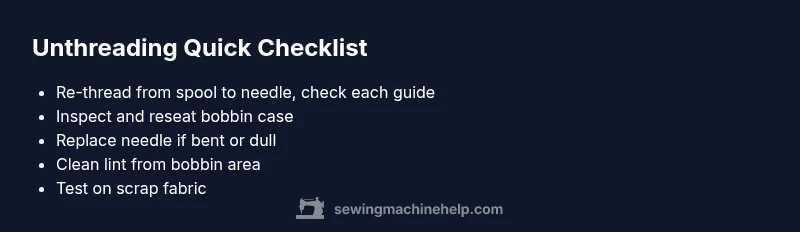
- easyRe-thread the machine from spool to needle, ensuring each guide is clean and seated
- easyRe-seat the bobbin with correct orientation and re-test, check for smooth bobbin rotation
- easyReplace the needle and verify correct needle type/size for fabric
- easyClean the bobbin area and tension discs, remove lint, and re-test
Your Questions Answered
Why does my thread keep unthreading even after I re-thread the machine?
If it still unthreads after re-threading, revisit the threading path for skipped guides, check the needle for damage, and inspect the bobbin area for lint. Sometimes the tension discs or bobbin case are misaligned after cleaning. Use scrap fabric to verify the issue is resolved after each adjustment.
If you still see unthreading after re-threading, re-check every guide and the bobbin area, then test on scrap fabric to confirm.
Can a bent needle cause unthreading?
Yes. A bent needle can prevent threads from seating properly and create loops or bird-nesting. Replace the needle with a new one of the correct type for your fabric, then re-thread and test.
A bent needle often causes looping or skipping—replace it and test again.
Does spool tension affect unthreading?
Yes. If the spool thread tension is too tight or too loose, it can feed unevenly and cause unthreading. Ensure the spool is seated correctly and the thread unwinds smoothly through the guides.
Spool tension matters—make sure the thread feeds smoothly from the spool through all guides.
How often should I clean the bobbin area to prevent unthreading?
Clean the bobbin area every 8–10 hours of sewing or at the end of a project, removing lint and thread fragments that can interfere with tension.
Clean the bobbin area regularly to keep tension stable.
When should I replace the needle?
Replace the needle after every project or if you notice scratches, burrs, or fabric snags. A sharp, correct needle prevents threading issues and skipped stitches.
Replace the needle when it’s dull or damaged to avoid threading issues.
Watch Video
The Essentials
- Re-thread carefully to ensure proper path
- Check bobbin seating and tension regularly
- Replace needles to prevent dulling and mis-threading
- Keep machine clean to reduce friction and jams