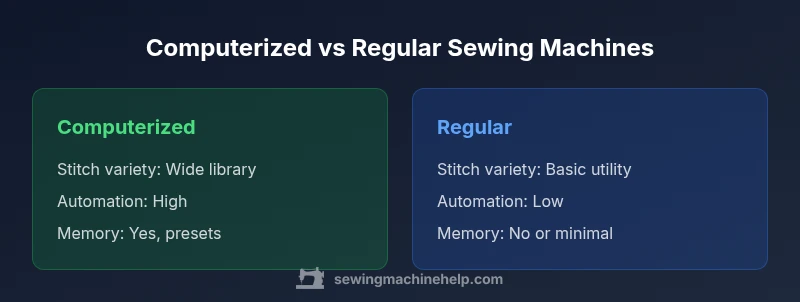
Computerized Sewing Machine vs Regular: A Practical Comparison for Home Sewists
Explore the key differences between computerized sewing machines and regular mechanical models. Learn how automation, stitch variety, maintenance, and value affect your projects in this objective buying guide for home sewists.


According to Sewing Machine Help, computerized sewing machines offer built-in stitches, automated threading, and memory functions that simplify complex projects, while regular (mechanical) machines emphasize durability and straightforward operation. This quick comparison outlines the key trade-offs—automation versus simplicity, cost versus value—so home sewists can choose the model that fits their projects and budget.
Computerized Sewing Machine vs Regular: An Overview
In the world of sewing machines, two broad families dominate most consumer choices: computerized sewing machines and regular mechanical machines. A computerized model uses a microprocessor, electronic controls, and often a display screen to guide stitch selection, tension, and speed. A regular machine relies on mechanical dials, levers, and manual adjustment with fewer automated steps. For home sewists, the decision often comes down to how much automation you want, what kinds of projects you plan to tackle, and how much you’re willing to invest upfront. The Sewing Machine Help team often highlights that most hobbyists value a balance between capability and simplicity; newer sewists may prefer fewer bells and whistles to avoid overwhelming setups. A good rule is to map your typical projects to the features you’ll actually use rather than chasing every new feature.
How a Computerized Sewing Machine Works
A computerized sewing machine integrates electronics with a motorized drive system. The onboard processor handles stitch selection, length, width, needle position, and even automated features like thread trimming and needle up/down. You’ll typically find a clear LCD or touchscreen interface, built-in memory for saving preferred stitches, and sometimes automatic threading. This setup can dramatically speed up quilting, garment making, and decorative projects, especially when you need consistent results across multiple items. Highly automated features reduce manual steps, which helps when you’re sewing repetitive patterns or sewing many identical pieces. From the perspective of the Sewing Machine Help analysis, automation tends to improve repeatability and overall speed, but it can add complexity when troubleshooting or performing maintenance.
How a Regular (Mechanical) Sewing Machine Works
A regular, or mechanical, machine emphasizes straightforward mechanics: a spring-loaded tension system, hand-operated controls, and fewer electronic components. You’ll select stitches with simple dials, adjust tension and stitch length manually, and often rely on an external buttonhole attachment or foot pedal programming to achieve specialty stitches. Mechanical machines are typically robust, simple to repair, and easier to source parts for, which lowers long-term maintenance costs. They also tend to be lighter and cheaper upfront. For beginners who want a reliable, no-frills experience, a solid mechanical model can cover most basic tasks well. The trade-off is limited stitch variety and fewer automatic conveniences, which may slow you down on larger or more intricate projects.
Key Features to Compare
When evaluating computerized versus regular machines, consider these core criteria:
- Stitch library and variety: computerized models usually offer many decorative stitches, alphabets, and built-in programs; mechanical machines focus on utility stitches.
- Automation and convenience: features like auto-threading, auto-tension, memory presets, and automatic buttonholes are common in computerized models but rare in mechanical ones.
- User interface: digital displays and touch controls are easier for some users, while others prefer tactile dials and fewer screens.
- Maintenance footprint: electronic components add potential failure points; mechanical machines typically have simpler maintenance needs.
- Price and value: while computerized machines demand a higher upfront investment, they can save time on complex projects; mechanical machines are often more affordable upfront.
- Durability and repairs: robust mechanical builds can withstand heavy use and are easier to repair in many regions.
- Compatibility and upgrades: computerized machines may require firmware updates or feature-specific accessories; mechanical machines rely on basic accessories that have long availability.
Use Cases: Which Type Excels For What
Different sewing projects benefit from different toolsets. Garment construction and garment alterations often benefit from a broad stitch library and precise control offered by computerized models, especially when you need consistent topstitching and automated features. Quilters may appreciate the embroidery-like stitches, color-coded options, and memory functions for multiple blocks. Decorators and crafters who rely on decorative stitches or monograms can leverage computer-assisted programs to speed up workflows. Regular machines excel for straightforward repairs, basic alterations, and projects that don’t require extensive stitch variety. If you frequently sew in locations with limited power or need a dependable bedside machine for quick repairs, a robust regular model can be a reliable partner.
Maintenance and Longevity: Upkeep for Both Types
Maintenance expectations differ between the two types. Computerized machines require careful power management, clean electronics, and occasional software updates (where available). Regular cleaning of lint-prone areas, oiling of moving parts, and timely bobbin maintenance remain essential for both types, but the electronic components of computerized models add a potential extra maintenance layer. The good news is that when properly serviced, computerized machines can deliver years of headache-free operation, especially if you invest in a model with reputable components and firmware support. For mechanical machines, regular oiling, cleaning, and periodic timing checks usually suffice, and parts are often easier to source and replace. Regardless of type, keep a clean workspace, protect against dust, and follow the manufacturer’s service schedule.
Learning Curve and Setup Tips
New users may feel overwhelmed by the extra features of computerized machines, but the payoff is often faster setup once you understand the layout. Start by learning basic stitches and tension with simple fabrics before advancing to complex decorative stitches. Use the built-in learning aids, if available, and practice with scrap fabric to reduce waste while you gain familiarity with the interface. For mechanical machines, invest time in mastering tension and needle selection since these controls are more often manual. The goal is to reach a level where you can set up, sew several seams accurately, and switch between tasks without second-guessing.
How to Decide: A Step-by-Step Framework
- List your typical projects and required stitches. 2) Compare your budget against the upfront cost and long-term value. 3) Consider your learning curve tolerance and willingness to adapt to electronics. 4) Check warranty and service availability in your area. 5) If you’re unsure about future needs, consider a model that offers a practical balance of features. 6) Try both types in-store if possible to gauge how each feels in real use. Following this framework helps ensure your choice aligns with your priorities and long-term sewing goals.
Common Myths Debunked
Myth: computerized machines always sew faster. Reality: speed depends on the motor and user control; automation can save time, but performance depends on the task. Myth: mechanical machines are less capable. Reality: a solid mechanical model handles many routine tasks with reliability and simple maintenance. Myth: more stitches equal better sewing. Reality: the right stitches for your projects matter more than sheer quantity. Myth: updates are mandatory. Reality: firmware updates may add features, but many machines operate perfectly without them.
Practical Buying Checklist for Home Sewists
- Define your projects (garment making, quilting, crafts, repairs).
- Assess how important automation is for you and whether you value memory or programmable stitches.
- Set a realistic budget that includes accessories (presser feet, bobbins, needle sets).
- Check local service options, repairability, and warranty length.
- Compare user experiences and online reviews focused on reliability and ease of maintenance.
- Try in-store demonstrations to gauge ergonomics and interface familiarity.
- Consider future needs, such as upgrading to specialty feet or embroidery modules if relevant to your goals.
Comparison
| Feature | Computerized sewing machine | Regular sewing machine |
|---|---|---|
| Stitch variety | Large built-in library with decorative stitches and programs | Fewer built-in stitches, mainly utility stitches |
| Automation and features | Automated threading, memory presets, automatic buttonholes, LCD/UI | Minimal automation, manual controls |
| Memory/programs | Yes, can save custom stitches and settings | No memory or very limited programming |
| Ease of use | Intuitive interfaces can speed setup | Straightforward operation with tactile controls |
| Maintenance complexity | Electronic components add potential points of failure | Mostly mechanical, simpler troubleshooting |
| Price/Value | Higher upfront cost with more features over time | Lower upfront cost and proven durability |
| Best for | Projects needing variety, automation, and speed | Beginners, budget-conscious projects, basic sewing |
Strengths
- Expanded stitch options and automation save time
- Presets and memory improve consistency across projects
- User-friendly interfaces help beginners learn faster
- Potentially faster sewing for large tasks
Negatives
- Higher upfront cost and potential ongoing maintenance
- Electronics can complicate repairs and troubleshooting
- Firmware or software considerations may affect compatibility
- Power requirements and battery backup considerations for some models
Computerized machines are the versatile choice for projects that benefit from automation and a wide stitch library; regular mechanical machines offer reliability and affordability for basic tasks.
If your priority is versatility and efficiency, choose a computerized model. If budget, simplicity, and proven durability matter more, a mechanical machine is likely the better fit. The Sewing Machine Help team recommends matching features to real project needs and testing options in-store when possible.
Your Questions Answered
What is a computerized sewing machine?
A computerized sewing machine uses an onboard processor and electronic controls to manage stitch selection, length, width, and various automated features. It often includes a display and memory for saving settings. This makes complex tasks faster and more repeatable, especially for decorative stitches or quilts.
A computerized machine uses a small computer to pick stitches, set lengths, and run automatic features, making complex tasks quicker.
Are computerized machines harder to repair than regular ones?
They can be more complex due to electronics, which may require specialized service for certain issues. However, many common problems are still simple to diagnose, and authorized repair options are available for most major brands.
Yes, electronics can complicate repairs, but many issues are still manageable with proper service.
Do computerized machines require special maintenance?
Maintenance is similar to mechanical machines but with extra attention to dust-free electronics, firmware updates if provided, and careful cable management. Regular cleaning, oiling of moving parts, and following the manufacturer’s guidance remain essential.
They need the same basic care as regular machines, plus a bit more attention to electronics.
Is a regular mechanical machine sufficient for basic sewing tasks?
Yes. For most basic tasks like hems, straight seams, and simple repairs, a reliable mechanical machine handles well and is typically more affordable to buy and maintain.
For basics, a mechanical machine is more than enough.
Which type is better for beginners?
Many beginners start with a mechanical machine to learn fundamentals. Once comfortable, they may upgrade to a computerized model to access automation and more stitch options.
Beginners often start with mechanical machines and upgrade later if they want more features.
Can you upgrade a mechanical machine to computerized?
In most cases, you cannot convert a mechanical machine into a true computerized one. You can, however, add features like a more advanced presser foot, better threading aids, or a sewing computer module if the brand offers compatible accessories.
Upgrading to full computerization usually isn’t possible; look for a new model with the features you want.
The Essentials
- Define your projects and budget before choosing
- Choose computerized for decoration, automation, and speed
- Choose mechanical for basics and long-term value
- Assess maintenance needs and service availability
- Test drive both types if you can before buying