How to Use an Embroidery Machine: A Beginner's Guide
Learn how to use an embroidery machine with a complete, beginner-friendly guide. From setup and threading to transferring designs and finishing your project, this tutorial covers tools, tips, and troubleshooting for home sewists.


With an embroidery machine, you will learn how to prepare fabric and stabilizers, thread the machine, hoop your project, transfer a design, and run a test stitch. This guide covers setup, embroidery settings, troubleshooting, and finishing tips for beginners. Youll need a hoop, stabilizers, embroidery thread, fabric, and a USB or built-in design library.
Understanding Embroidery Machines
If you are asking how do you use embroidery machine, you are not alone. This device blends mechanical precision with creative design, offering built-in patterns and the ability to import custom artwork. According to Sewing Machine Help, modern machines can handle multiple hoop sizes, fabric types, and thread weights, with intuitive menus that guide you through setup. For home sewists and beginners, the most important idea is to start simple: master the basics before expanding to dense designs or specialty stitches.
Embroidery machines include a needle, a presser foot, a bobbin system, and a motorized embroidery head that moves in precise X and Y directions. They differ from standard sewing machines by their ability to embroider on fabric while the needle passes the thread through a pre-made design. The goal is to align your material, secure the stabilizer, and load your design so that the needle stitch path matches the planned artwork. With practice, you will develop a feel for how fast to run the hoop and how to handle different fabrics.
Sewing Machine Help's guidance emphasizes planning and testing. Start with a simple monogram or a small motif on a scrap fabric to learn tension and stitch density. Keep the machine clean, replace worn needles promptly, and store designs in a library for quick reuse. By learning these fundamentals, you will gain confidence for more complex projects.
Preparing Your Embroidery Setup
Getting ready to embroider means choosing the right combination of stabilizer, fabric, hoop, and design placement. Start by selecting a hoop that matches your fabric area and the design size. Place a compatible stabilizer behind the fabric to prevent puckering and to support stitches. Tear-away stabilizers work well for woven fabrics, while cut-away stabilizers are better for knits; in some cases, a water-soluble stabilizer is ideal for delicate fabrics or layered designs. Before you begin, measure the design area and mark the center on the fabric so the motif lands exactly where you intend. If your machine supports presets, set the hoop orientation to match the design orientation.
Next, inspect your fabric for loose threads, lint, and nap direction. Align the stabilizer against the back of the fabric and smooth out any wrinkles. Always test on a scrap piece to confirm that fabric thickness and stabilizer work harmoniously with the chosen design. This practice reduces the chance of misalignment and thread breaks once you embroider the real project. A careful setup lays the foundation for clean, professional results and saves time on later projects.
Threading, Bobbins, and Needle Size
Threading an embroidery machine is a precise task; a wrong path can cause thread breaks and run-away threads. Start by winding a bobbin with the correct thread and gently loading it into the bobbin case. Then thread the upper path following the machine manual, paying attention to any thread guides and tension discs. The needle size matters too; most embroidery runs best with a 75/11 or 80/12 needle, chosen based on fabric thickness and thread weight. Use embroidery needles designed for machine embroidery to minimize lint and skipped stitches. If you have a jam or bird-nesting in the bobbin area, stop immediately and re-thread both upper and lower threads. Keep spare needles on hand and change them after every few hours of stitching or when you notice skipped stitches.
Tension settings influence stitch quality. Many machines auto-adjust, but you may need to fine-tune the upper thread tension if a stitch looks loose or heavy. Do not force the thread through tight guides; if tension is off, stop, re-thread, and test on fabric scrap. This practice helps prevent fabric damage and ensures consistent embroidery quality across projects.
Transferring Designs and Hoop Preparation
Transferring designs to an embroidery machine can be done via USB, SD card, or built-in pattern libraries. Ensure the design orientation matches your hoop and that the hoop is secured in the machine. Some machines require you to center the design in the work area using built-in guides or software grids. Before stitching, verify the machine recognizes the design and that it fits within the hoop boundaries; an oversize design will not scan correctly and may cause thread breaks or misalignment. If you are using software, export the file in the machine’s compatible format and save backups in two locations.
Hooping is a critical step. Align the fabric and stabilizer, smooth out wrinkles, and tighten the hoop evenly with a press or a grip that does not distort the fabric. The goal is to create a flat, tensioned area where the stitches land precisely. A poorly hooped fabric shifts during stitching, resulting in off-center designs and puckering. After securing the hoop, run a quick test stitch on scrap fabric to confirm alignment before proceeding to the final project.
Stabilizers, Fabrics, and Thread Types
Choosing stabilizers, fabrics, and thread types is essential for clean embroidery. For woven cottons, use a tear-away or cut-away stabilizer that supports stitches without adding bulk. For knits, choose a stabilizer that prevents stretching and maintains stitch integrity; a water-soluble stabilizer can be used on delicate fabrics to avoid stiff texture. When selecting thread, polyester and rayon are common choices for machine embroidery; polyester offers durability and colorfastness, while rayon yields a softer, glossy finish. Consider colorfastness for fabrics that may launder frequently. For dense designs, a heavier stabilizer helps preserve stitch definition, while light designs may benefit from lighter stabilizers to minimize bulk and improve drape. Practice with scrims to determine the combinations that produce the best result for your chosen project. Remember to adjust tension to accommodate different fabrics and stabilizers so that stitches lay flat and uniform.
Running a Test Stitch and Adjusting Settings
Always start with a test stitch on a scrap piece to verify setup, tension, and design alignment. Begin with a low speed, especially on start-up, to ensure your device engages smoothly with the stabilizer and fabric. Watch for skipped stitches, thread breaks, or loops forming on the underside. If issues appear, re-thread both top and bottom threads and re-check the needle size against the thread weight. Density settings influence the final look; high density can cause puckering on lightweight fabrics, while too sparse stitching can produce visible gaps. Make minor adjustments in small increments and test after each change. A methodical approach reduces waste and yields crisp, professional embroidery results.
Finishing, Care, and Troubleshooting Common Issues
When the embroidery is complete, allow the design to cool before removing the hoop. Gently trim any jump threads and remove stabilizer according to its type: tear-away is often brushed away, while cut-away may require trimming close to stitches. If stabilizer remains visible, you can wash or soak fabrics that tolerate water, or use a fabric-safe iron to flatten edges. For stubborn threads or fabric lift, re-hoop and re-stitch small portions rather than attempting to alter the embroidery in place. Regular machine maintenance, such as cleaning lint from the bobbin area and changing needles after several hours of stitching, helps prevent recurring problems. If you encounter persistent issues like thread breaks, take time to review threading paths, needle compatibility, and stabilizer choice to identify root causes.
Advanced Tips for Precision Embroidery
Once you are comfortable with basic usage, explore enhancements that improve precision. Use magnets or alignment guides to position designs with exact centering. Experiment with stabilizers and backing to achieve different textures and finishes. Keep a log of fabric types, stabilizers, and thread combinations that yield best results; this becomes a quick reference for future projects. Upgrade to software that allows vector or high-resolution design transfers if you want more control over stitch paths and density. Practice with more complex motifs on test fabrics before applying them to your final project.
Safety, Maintenance, and Next Steps
Embroidery machines are powerful tools that require attention to safety and maintenance. Always disconnect power before changing needles or cleaning internal parts. Use a small brush to remove lint and avoid using metal tools that could damage the needle plate. Replace worn needles promptly and store spare parts in a dry, clean place. As you progress, begin to assemble a library of designs and project ideas to streamline future work. The ongoing practice will build your confidence and elevate the quality of your embroidery projects, empowering you to tackle more challenging textiles and larger designs.
Tools & Materials
- Embroidery hoop (proper size for project)(Choose hoop size that fits the design area (e.g., 4x4, 5x7 inches))
- Stabilizers (tear-away or cut-away)(Match stabilizer to fabric weight and design density)
- Embroidery thread (polyester or rayon)(Choose colorfast options; use bobbin thread compatible with fabric)
- Fabric for testing and final project(Pre-wash for shrinkage if needed; ensure fabric is suitable for embroidery)
- Embroidery needle size 75/11 or 80/12(Use dedicated embroidery needles; change after a few hours of stitching)
- Bobbin threads (matching or contrasting)(Wind evenly; avoid overfilling bobbin case)
- Screwdriver or tool for needle plate access(Only if your machine requires manual maintenance)
- Stabilizer pen or chalk for placement(Helpful for marking center lines on fabric)
- USB drive or SD card for designs / built-in designs(Ensure compatibility with your machine)
- Clean cloth and lint brush(Keep lint away from bobbin area to prevent jams)
Steps
Estimated time: 90-120 minutes
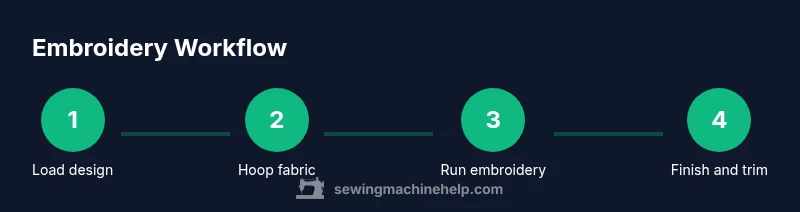
- 1
Power On and Set Up
Turn on the machine, select embroidery mode, and confirm the hoop is properly seated. Check that the design library or USB drive is accessible. Ensure the workspace is clean and there is adequate lighting for alignment.
Tip: Verify firmware and design compatibility before starting. - 2
Load Your Design
Choose or transfer the design to the machine. Confirm orientation and size match the hoop. Save the design as a new file if you are modifying it for your project.
Tip: Always preview the design path on screen before stitching. - 3
Hoop Fabrics and Stabilizer
Layer stabilizer behind the fabric and secure in the hoop. Ensure the fabric is taut but not stretched. Remove wrinkles and position the center of the design in the hoop.
Tip: If fabric is slippery, use a light spray adhesive or temporary spray starch to stabilize. - 4
Thread the Machine
Route the upper thread through all guides and the needle; thread the bobbin and place it in the case. Check for proper threading to avoid looped threads on the back.
Tip: Use a fresh needle and ensure the thread is not catching on any guides. - 5
Set Density and Speed
Adjust stitch density to suit fabric and design complexity. Start with a low speed for the first few stitches to confirm tracking.
Tip: Too high density on light fabrics causes puckering. - 6
Position and Begin
Lower the needle to the starting position and start the embroidery. Watch the first few stitches closely for alignment and tension issues.
Tip: If misalignment appears, stop and recheck hoop and design placement. - 7
Monitor and Troubleshoot
Observe for thread breaks, bird-nesting, or fabric shifting. Pause if tension is off, and re-thread both threads if needed.
Tip: Keep a scrap fabric handy for on-the-fly tests. - 8
Finish and Remove Hoop
When the design completes, lift the presser foot, remove the hoop, and let the fabric cool before trimming threads.
Tip: Do not jerk the fabric; handle gently to avoid distortion. - 9
Clean Up and Store
Brush out lint from the bobbin area and clean the needle plate. Store designs and stabilizers in a labeled folder for future use.
Tip: Replace needles after several hours of stitching or after a snag.
Your Questions Answered
What stabilizer is best for lightweight fabrics?
Light fabrics benefit from a light tear-away or cut-away stabilizer, depending on the design density. If in doubt, start with a lighter stabilizer and test on a scrap before proceeding.
Light fabrics work well with a light stabilizer. Always test on a scrap first.
How do I center a design on fabric?
Mark the fabric center with chalk or a fabric marker and align the design with the hoop marks. Use the machine's alignment features and preview the path before stitching.
Mark the center and use alignment guides to position the design, then preview.
Why does embroidery thread bunch or break?
This usually means incorrect threading, wrong needle size, or improper tension. Re-thread both top and bobbin, verify needle compatibility, and test on scrap.
Most thread issues come from threading, needle size, or tension. Re-thread and test.
Can I embroider on denim or stretchy fabrics?
Yes, but you need proper stabilizers and possibly different needles. For denim, use a heavier stabilizer and a larger needle; for stretch fabrics, increase stabilizer support and adjust tension.
Yes, with the right stabilizer and needle choices.
What should I do after finishing embroidery?
Trim jump threads, remove stabilizer as appropriate, and decide whether to wash or press the fabric. Store the project carefully to avoid distorting the design.
Trim threads, remove stabilizer, and care for the fabric as needed.
Watch Video
The Essentials
- Prepare with the right stabilizers and hoop.
- Thread and hoop correctly to avoid bugs and puckering.
- Test first; adjust density and speed gradually.
- Finish with careful trimming and cleaning.